Those of you who, like me, like to grab the next tabletop box set on a whim know the problem: The miniatures are sitting on the table, fresh out of the box, but it feels like an eternity before you’ve neatly recorded all the stats, tonnages, combat roles, and specifications for your own collection.
That’s exactly why I’ve developed a new feature for my hangar on The Tactical Screen that will make your life a whole lot easier starting now: the ability to check in entire ForcePacks directly into your hangar!
No more frustration with manually entering units
Until now, you had to select each unit from a new set individually and manually transfer it to your hangar. That’s a thing of the past now.
The process is kept as simple as possible:
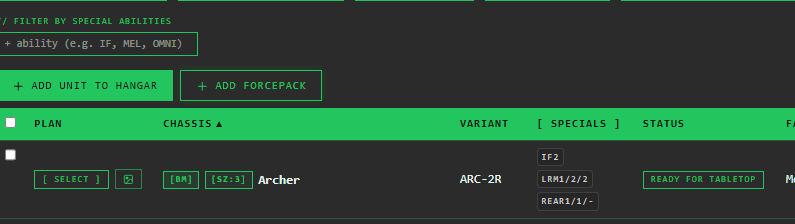
- One click: Right next to the familiar “Add unit to hangar” button, you’ll now find the new “Add ForcePack” button (or the German translation).
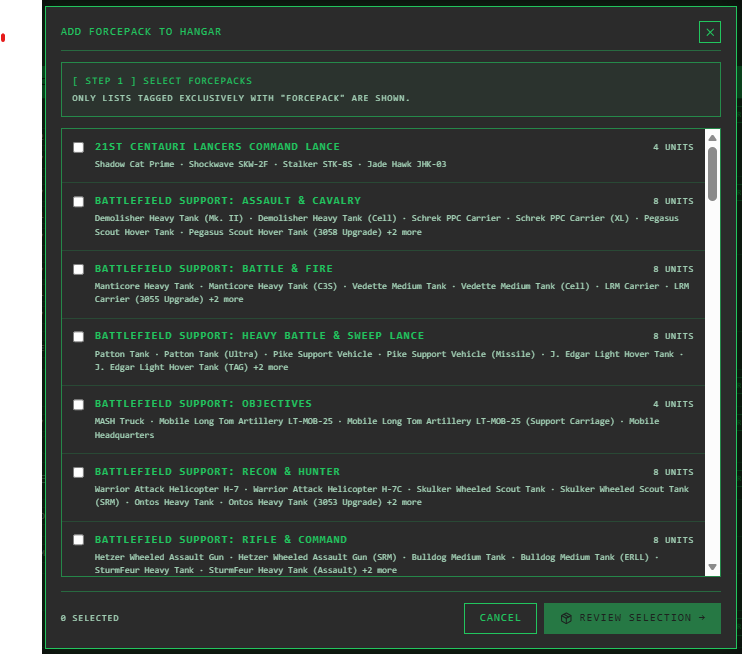
- Make your selection: As soon as you click it, a dialog box will open showing all available ForcePacks, including a preview of the units they contain. If you’ve earned multiple boxes at once, simply select as many as you want.
- Complete Overview: In the confirmation dialog that follows, you can see at a glance all units along with their enhanced game data—from UnitType and Unit Size to Tonnage and Combat Role—drawn directly from classicstats and alphastrikestats.
- Added to your inventory: Click Confirm, and all the units will be added directly to your hangar.
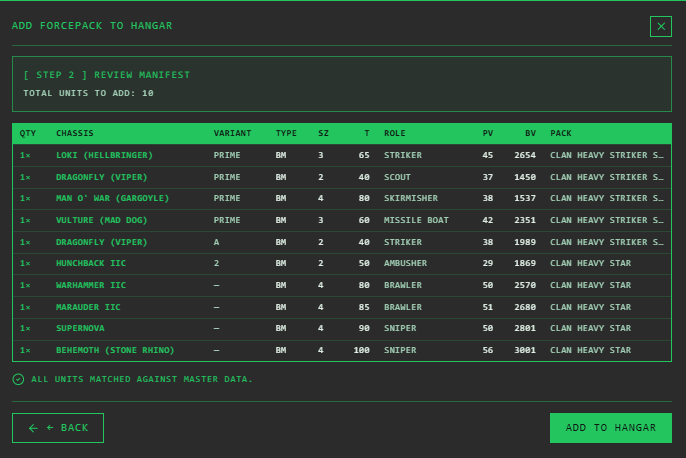
Your Benefits: Save Time & Stay Organized
The biggest advantage is obvious: maximum time savings.
You buy a new ForcePack, select it from the list, and your collection is up to date in seconds.
In addition, all newly imported units are automatically saved in your database with the status “Unopened / Box.” This way, you always have a perfect overview of what’s still in its original packaging in your cabinet, what’s next on your painting and crafting table, and which units are already ready to play.
Try out the new feature right in the hangar and let me know what you think!
Transparency notice on the use of AI (in accordance with the EU AI Act):
The content of this blog is personally conceived, researched and defined by me. I use generative artificial intelligence to help me formulate and structure the texts.
Why? This enables me to prepare complex issues more precisely and to focus fully on the quality of the content and research. The final editorial control and responsibility for all published content lies solely with me.
Together for better content!
This blog is a project of the heart that can only continue to grow with your help. Every comment, every recommendation – and especially your financial support – secures the future of this platform.
Do you want this content to remain freely accessible?
This is how you can support the mission:
- NEWSLETTER REGISTRATION: Become part of the fast-growing community and never miss an update again!
- BECOME A PATREON MEMBER: Join the inner circle and get access to exclusive material and early releases.
- OTHER SUPPORT: Whether it’s a donation, sharing a post or recommending the blog to others – every form of support counts!
Let’s make this blog an even better place together!
Ich bin Sören Spieckermann, der Kopf hinter mechstrategen. Seit Jahren faszinieren mich taktische Tabletop-Schlachten und die strategische Tiefe von Mechs. Ob schnelle Gefechte in Halo: Flashpoint oder epische Schlachten bei BattleTech Alpha Strike – hier teile ich meine Erfahrungen und Taktiken mit dir. Mein Ziel? Sowohl Einsteigern den Start zu erleichtern als auch alten Hasen neue Impulse für das nächste Match zu geben.