The Big October Update for The Tactical Screen
Cleaner, faster to play, and tailored to every type of player: New Home Screen · Simple Mode · Unit Gallery · CBT Weapon Data · Smart Picker · Optimized Hangar · New Manual (DE/EN) · Troop KPIs
Anyone who, like me, regularly builds tabletop armies and brings them to the gaming table knows the problem: Whether I’m planning a 200-point BattleTech Alpha Strike list for my next Saturday game or a highly specialized list for Classic BattleTech—in the end, I don’t want to have to sift through endless menus. I want to register my miniatures, check the list, and jump right into the fray!
Over the past few months, my site, The Tactical Screen, has gained a tremendous amount of tactical depth. But too much data and too many charts can slow down the flow of the game. As part of our major October update, I’ve therefore thoroughly revamped the platform: with a restructured homepage, a streamlined Simple Mode, a visual unit gallery, complete Classic BattleTech weapon data, intelligent skill and quantity selection, an optimized hangar layout, a completely rewritten bilingual manual, and radically streamlined Force KPIs in the Force Lists.
Here’s my overview of all the new features—and how they’ll make your next game night noticeably easier!
1. The New Home Page: Jump Right into the Action in Three Steps
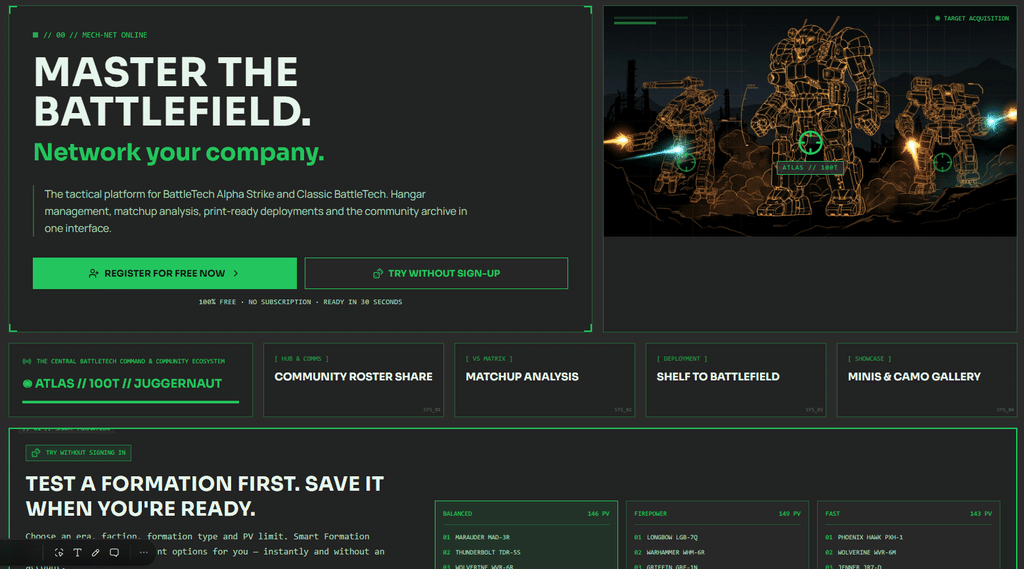
When you or new players open The Tactical Screen for the first time, you shouldn’t have to spend time poring over manuals right away. The home screen was completely revamped with the October update and is fully optimized for your gameplay flow:
- Tactical Hero in Full Screen: The mech artwork now adapts to any screen—from widescreen monitors to smartphones. The most important features are right at your fingertips: You can register for free or try out the Smart Formation Generator right away as a guest.
- Try it first, then decide: A user account isn’t required to get started. With the built-in Smart Generator, you can immediately roll out rule-compliant troops. Only when you want to permanently save your Force Lists, manage your own digital hangar, or export printable cards should you create your free profile.
- Real Product Previews: Instead of vague descriptions, the homepage gives you a direct look at the products—including a print-ready Alpha Strike map with all damage values and structure points, as well as a preview of the hangar.
- 3 Steps to a Game Night:
- Add miniatures: Import official Catalyst ForcePacks with a single click or upload your own CSV files.
- Build Your Army: Use the Smart Generator to calculate a balanced, legal list for your era in seconds.
- Print & Play: Print ready-to-play Alpha Strike cards directly or use them digitally on your tablet at the gaming table.
- Comparison Chart (Guest vs. Account): An overview shows you at a glance which features are freely available and what benefits having your own free hangar offers you.
- Behind the Scenes – SEO Optimizations: In addition to visual adjustments, numerous structural changes have been made to improve the platform’s visibility in search engines and draw new commanders’ attention to The Tactical Screen even faster.
2. The New Simple Mode: Fewer Menus, Full Focus
I don’t need complex C3 network routing, AS350 special criteria, or planetary campaign simulations every game night. Sometimes I just want to manage my miniatures, put together a classic 200-PV list, and print out my maps.
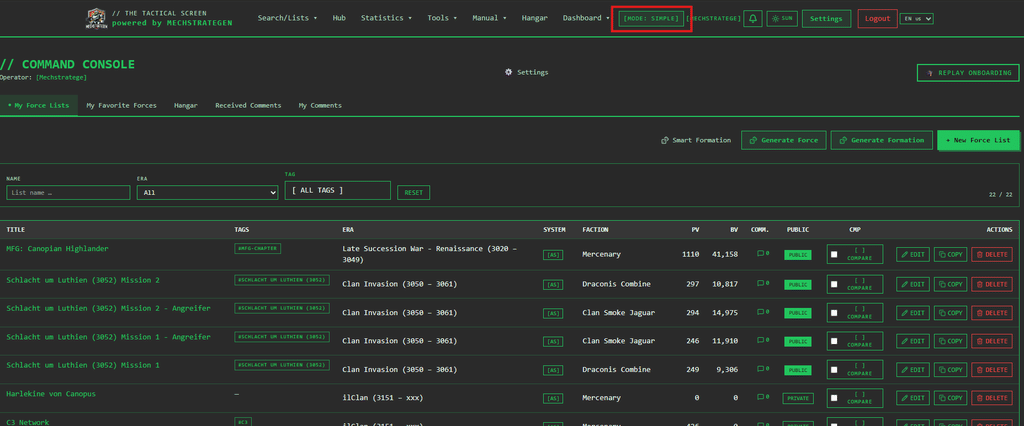
That’s exactly why I developed Simple Mode in the October update:
How does Simple Mode work?
- Getting Started for New Users: New accounts start in the user-friendly Simple Mode by default, so you can get started right away without being overwhelmed by information.
- Flexibility for veterans: Existing profiles remain in the familiar Advanced Mode. A single click in the header is all it takes to switch between modes at any time—your setting is saved permanently.
- Full access for guests: Even unregistered visitors retain access to all core features.
What do you see in Simple Mode?
- Streamlined main menu: Only the essential tools for quick games are visible—Hangar, My Lists, Public Archive, Alpha List, Community Hub, Statistics/Radar, as well as the Rulebook and Feedback. Advanced modules such as Ops Center, Showcase, Map Tool, and Conquest are discreetly hidden.
- Focused Dashboard: Full focus on your lists, favorites, comments, and the Hangar.
My Tactical Tip: Simple Mode provides an extremely fast, crystal-clear interface free of distractions, which is especially easy to use on a smartphone at the gaming table.
3. The New Visual Unit Gallery: Browse, Compare, & Discover
Spreadsheets and endless rows of data are perfect for tournament preparation and fine-tuning your final score. But if you’re looking for inspiration for your next painting project, want to find the right model to pair with a miniature in your display case, or simply want to visually explore the BattleTech universe, the right tool has been missing until now.
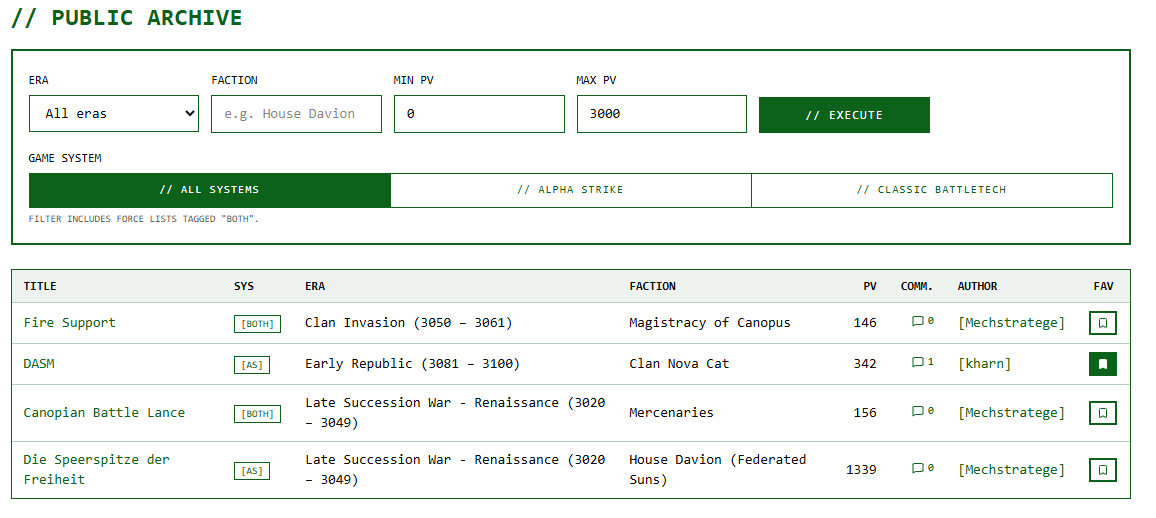
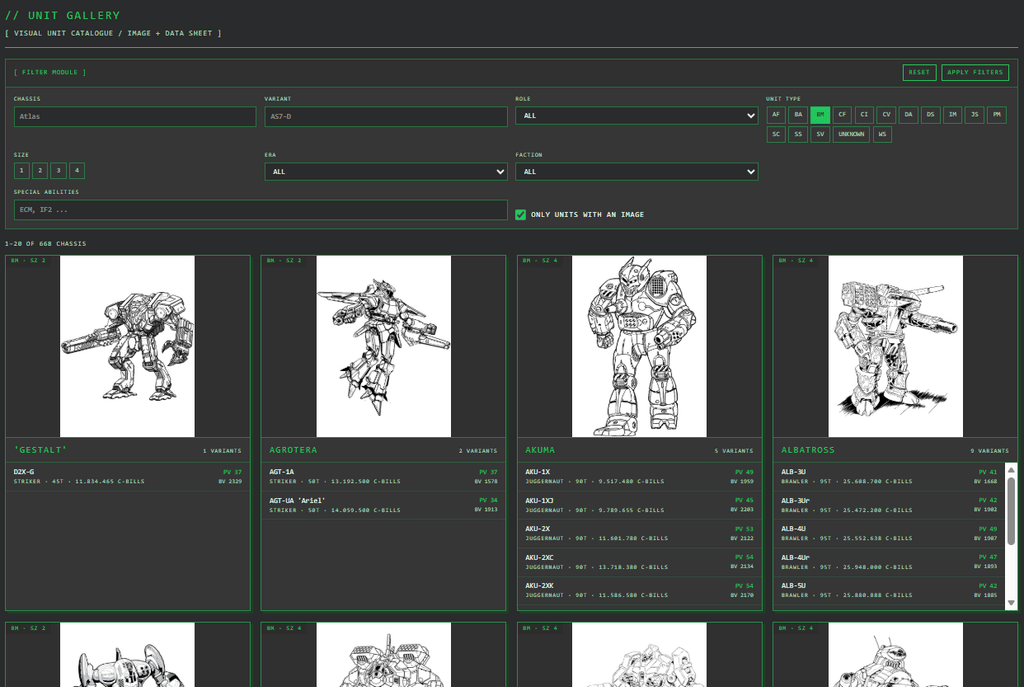
Under the menu item Search / Lists → Unit Gallery (/search/gallery), you’ll now find an image-based tile overview of all BattleTech units!
What makes the Unit Gallery special?
Instead of listing each individual variant separately, the gallery groups all units by chassis and image in a clear, easy-to-navigate map:
- Large Miniature & Chassis Preview: You can see right away which model it is.
- Variants at a Glance: All versions of the chassis are listed right on the card—including Alpha Strike Point Value (PV), Classic BattleTech Battle Value (BV), and the purchase cost in C-Bills.
- Clean & Fast: A maximum of 20 chassis tiles per page ensures lightning-fast load times and fatigue-free browsing.
The Interactive Double Data Sheet: Alpha Strike Meets Classic BattleTech
When you click on a variant in a tile, it doesn’t open a plain old menu—instead, it opens a full-featured, visual data sheet in a split-screen view:
- Alpha Strike Profile (left): Damage bands (Short, Medium, Long, Extreme), TMM, movement, overheating capacity, armor and structure circles, as well as all special rules (such as IF, C3, AMS, and many more).
- Classic BattleTech & Lore Data (right): Technology Base, Tonnage, Weight Class, C-Bills Cost, Drive Data, Cooling, Walk and Jump Values, and the new complete weapons table.
No matter which game system you’re playing: You’ll have all the numbers you need for gameplay right at your fingertips, without having to flip back and forth between different tools or books.
Cleverly pre-filtered for the perfect start
- Only units with images: This filter is enabled by default to ensure the gallery remains a true visual delight (it can be disabled with a single click if needed).
- Focus on the essentials: The unit types BattleMech (BM), Combat Vehicle (CV), and Battle Armor (BA) are already preselected. You can easily add other types, such as Air and Space or Infantry, at any time.
- Powerful search and filter options: Filter by chassis name, specific variant, weight class (Size 1 through 4), battlefield role (Brawler, Sniper, Skirmisher, etc.), era, or faction—just as precisely as you’re used to from the Alpha List.
4. Full Firepower: Detailed Classic BattleTech Weapon Data
Whether at the analog gaming table with hex grids or when developing the next mission doctrine: Anyone who plays BattleTech using the classic rules must know the details of their armament precisely. Which laser is mounted in which torso? What does the range profile look like? How much heat does the burst generate, and how many critical slots does the weapon occupy?
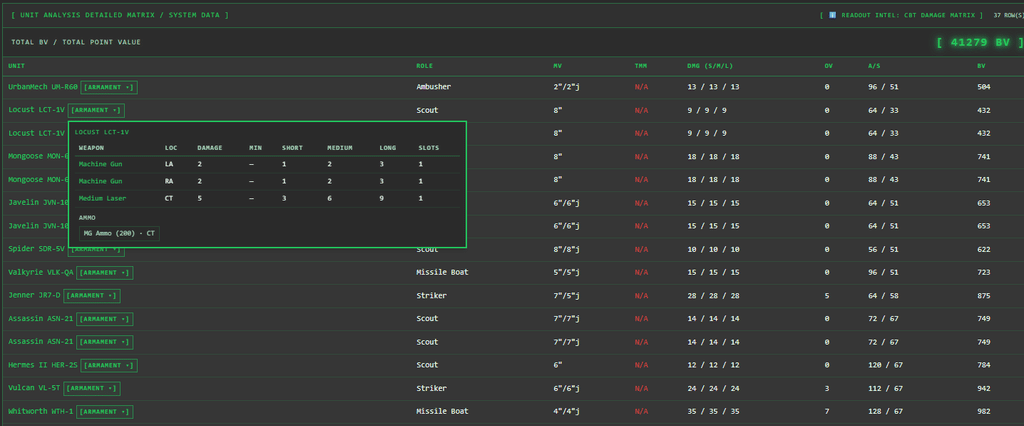
Until now, many digital quick-view features have focused primarily on Alpha Strike. That’s no longer the case: We’ve massively expanded the database for Classic BattleTech! Complete, detailed weapon data and mounting locations are now available for all 9,847 units in the system.
What’s new with the weapon data?
Instead of mere text abbreviations, each unit now has a fully structured weapon profile based on the official rulebook:
- Precise Mounting Locations: Each weapon is assigned to its exact hull segment (e.g., left/right arm, torso, head, or center torso—including rear mounting
(R)). - Complete range bands: Minimum range as well as short, medium, and long ranges (Min / S / M / L) at a glance.
- Damage & Heat Values: Exact specifications regarding damage potential and heat generation for each weapon system fired.
- Critical Slots & Weapon Categories: Identification of energy, ballistic, and missile weapons, as well as the occupied slots on the Record Sheet.
Where can you find the new weapon data?
The data has been seamlessly integrated into all key Classic sections of the Tactical Screen:
- In the Unit Gallery (
/search/gallery): In the interactive data sheet on the right (Classic BattleTech), you can immediately see what arsenal a Mech, tank, or vehicle has. - In your Force Lists (Tactical Readout): In any saved or newly created list in Classic BattleTech mode, you can click “
[Bewaffnung ▾]” under each unit to open the complete weapons table—ideal as a digital cheat sheet right in the middle of a game. - In the Unit Database Picker: Even as you’re building your list, you’ll immediately see all mounted weapon systems in the detailed preview when selecting a unit.
5. Build Your Dream Force Faster: Smart Skill and Unit Selection
Creating and refining army lists just got even more intuitive: From now on, manually typing in skill values or calculating point values is a thing of the past. Two targeted new features speed up your workflow from the first click in the database to the final tweaks on your list.
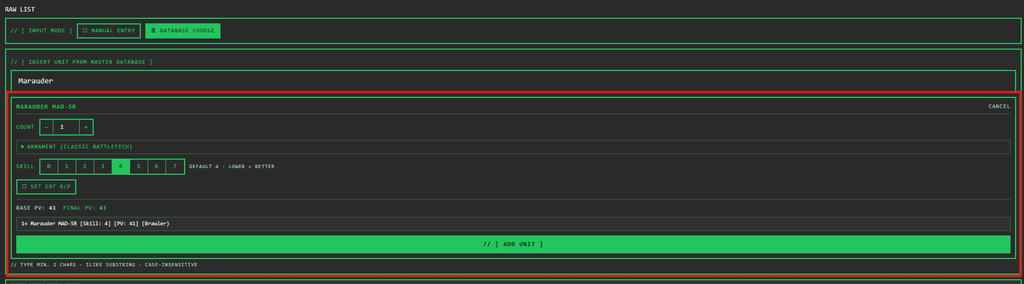
Smart Database Picker: Select Unit Type, Skill, and Points Directly Upon Insertion
Previously, the database search would insert a selected unit directly with default values. If you wanted to play variants with different pilot skill levels, you had to know the exact syntax and adjust the points manually.
Here’s what’s new:
- One-Click Quick Configuration: As soon as you click on a unit in the database, a compact bar opens.
- Set the quantity: Use ”
+” / ”–” or direct entry to select the number of units (e.g., ”2×” or ”4ד). - Select Alpha Strike Skill: Press a button to select the skill level from 0 to 7 (default is 4).
- Live PV Calculation: The point value is recalculated in real time according to the official multiplier table. You’ll immediately see both the base value and the adjusted final value.
- Optional Classic BattleTech (G/P): Players of Classic can additionally set Gunnery and Piloting.
- 100% error-free syntax: When you click “Add” (or
Enter), the line is guaranteed to be inserted with perfect syntax—including role, point value, and skill brackets.
Clickable Skill Badges in the Tactical Readout: Fine-Tuning with a Tap
Have you loaded an existing list or imported a third-party Force and want to quickly upgrade individual units or save points?
- In the live analysis (Tactical Readout) of your own lists, the skill labels are now interactive (
[AS Skill: 4 ▾]). - Clicking on a skill opens a quick-select menu for the skill values
0through7. - After you make a selection, the system automatically replaces the skill in the list text, recalculates the unit’s points, and updates the list’s total—all without having to manually search the text field.
6. Optimized hangar layout & a completely new, bilingual manual
Hangar management and the knowledge base have also undergone a thorough overhaul:
- Optimized Hangar Layout: The digital hangar has been revamped both visually and functionally. The arrangement of your mechs and vehicles is now much clearer, filtering by condition or paint status is smoother, and performance when scrolling through large collections has been noticeably improved. The “Wish List” has been moved to the bottom of the page and no longer takes up space on the right-hand side.
- New Manual (Bilingual DE/EN): The manual has been completely revised, restructured, and made fully bilingual. Whether you’re using German or English, you’ll now find rules, syntax guides, and feature explanations in a clean, clearly organized documentation.
7. Streamlined Force List KPIs: Metrics with Real Value
Until now, the Force List analyses have included a multitude of charts, range curves, and TMM evaluations. While this was informative, it sometimes obscured the essentials.
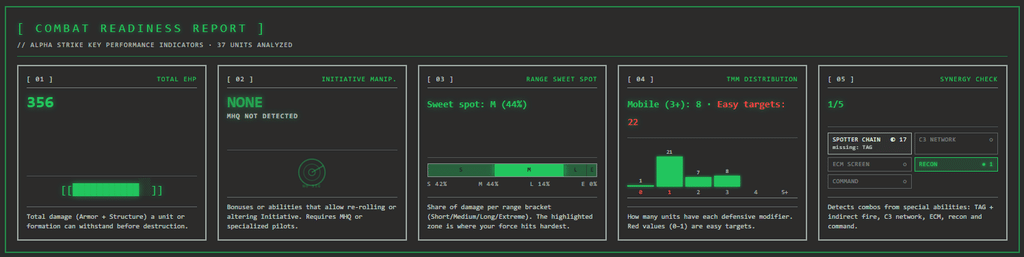
I’ve thoroughly streamlined the data: redundant displays have been removed, so that the troop analysis now provides you with five key metrics that succinctly summarize your list’s behavior on the battlefield:
- Range Sweet Spot (Optimal Engagement Band):What it shows: A dynamic color band visualizes in which combat zone—short range (0–6″), medium range (6–24″), or long range (24–42″+)—your forces deal the most damage.How it helps you: You can determine before your first turn at what distance you need to keep your opponent.
- TMM Profile & Target Vulnerability:What it shows: A compact histogram breaks down how many units have a Target Movement Modifier (TMM) of 3+ and how many “easy targets” (TMM 0–1) are in your ranks.How it helps you: You can immediately see whether your Mechs benefit from high speed or need to seek out cover.
- Synergy & Network Check:What it shows: Automatic quick verification of key tactical linkages: Are mobile spotters (TAG) available for indirect fire units (IF)? Is the C3 network operational? Are ECM or command units available?Your benefit: No more missed capabilities or incomplete networks before the first roll of the dice.
- Initiative Forecast (Turn Momentum):What it shows: Your total number of units combined with mobile scouts (RCN) and command post bonuses (MHQ).Your benefit: A realistic indicator of how often you maintain the initiative—and thus control of movement—throughout the game.
- Glass Cannon Index & Armor Reserve:What it shows: The direct ratio of raw firepower to hull and armor points.How it helps you: It shows you, plain and simple, whether your list is a tough anvil or will crumble at the first few hits it takes.
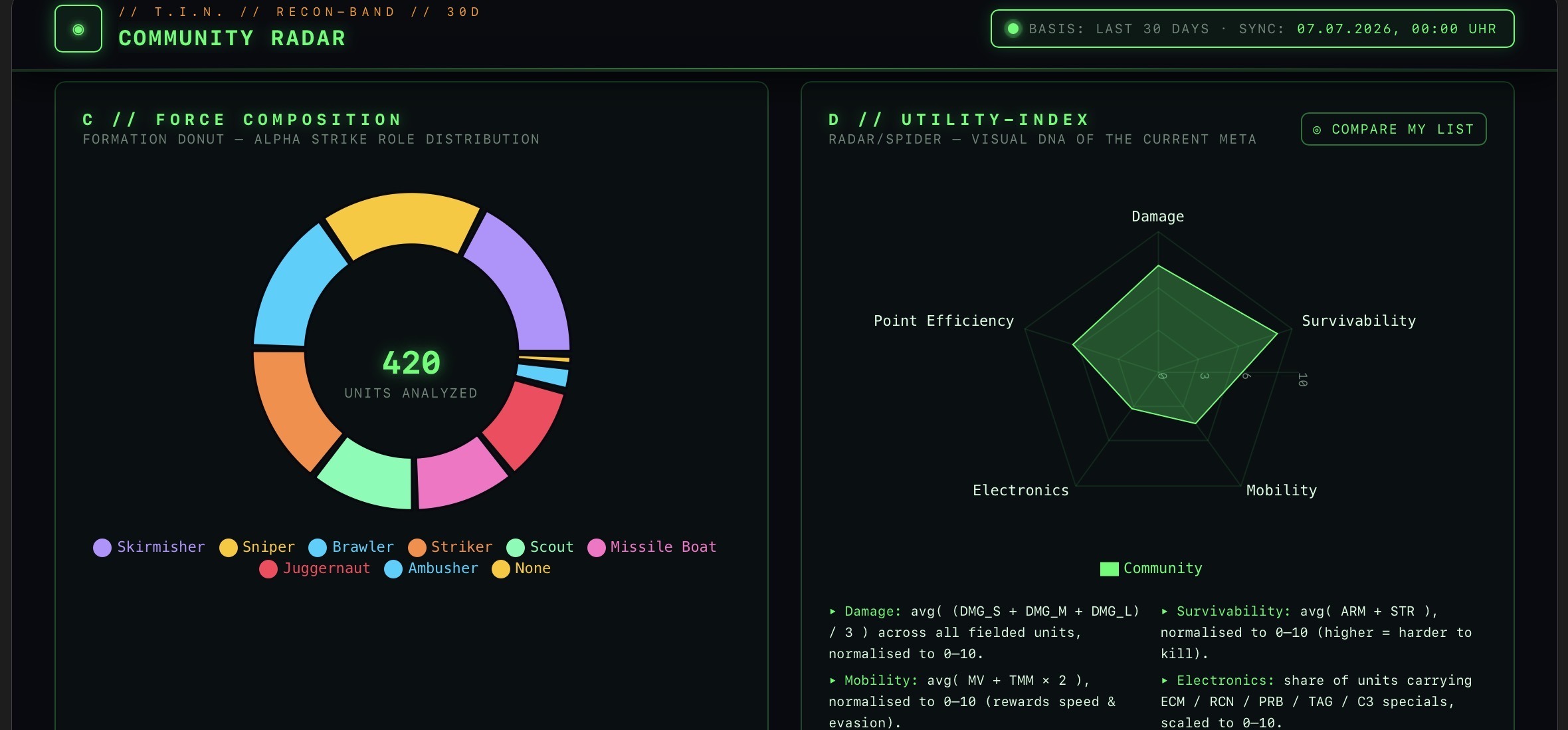
Note for data enthusiasts: More in-depth analyses, such as the radar chart for Alpha Strike roles or damage scatter plots, remain available alongside the main KPIs for fine-tuning your troops.
Bottom line: More playtime, less scrolling
With the major October update, The Tactical Screen becomes even more accessible to newcomers and casual players, without sacrificing the tactical depth you’ve come to expect. No more syntax errors, visual browsing in the new gallery, complete CBT weapon data for nearly 10,000 units, lightning-fast hangar management, a fully bilingual manual, and a crystal-clear overview of your squad’s strengths!
Try out the new look—temporarily switch to Simple Mode in your profile settings, test out the new unit gallery and the Smart Database Picker, and analyze your next lineups using the new troop KPIs!
Transparency notice on the use of AI (in accordance with the EU AI Act):
The content of this blog is personally conceived, researched and defined by me. I use generative artificial intelligence to help me formulate and structure the texts.
Why? This enables me to prepare complex issues more precisely and to focus fully on the quality of the content and research. The final editorial control and responsibility for all published content lies solely with me.
Together for better content!
This blog is a project of the heart that can only continue to grow with your help. Every comment, every recommendation – and especially your financial support – secures the future of this platform.
Do you want this content to remain freely accessible?
This is how you can support the mission:
- NEWSLETTER REGISTRATION: Become part of the fast-growing community and never miss an update again!
- BECOME A PATREON MEMBER: Join the inner circle and get access to exclusive material and early releases.
- OTHER SUPPORT: Whether it’s a donation, sharing a post or recommending the blog to others – every form of support counts!
Let’s make this blog an even better place together!

Ich bin Sören Spieckermann, der Kopf hinter mechstrategen. Seit Jahren faszinieren mich taktische Tabletop-Schlachten und die strategische Tiefe von Mechs. Ob schnelle Gefechte in Halo: Flashpoint oder epische Schlachten bei BattleTech Alpha Strike – hier teile ich meine Erfahrungen und Taktiken mit dir. Mein Ziel? Sowohl Einsteigern den Start zu erleichtern als auch alten Hasen neue Impulse für das nächste Match zu geben.