Major Update for The Tactical Screen: Campaigns, Color Generator, and Interactive Alpha Strike Cards!
There’s more news from the development front! Over the past few days, I’ve been working intensively on The Tactical Screen. In addition to the usual bug fixes and performance optimizations under the hood, the web app has gained three huge, completely new features with the latest release. Whether you want to strategically link your battles, find the perfect color scheme for your next miniature, or digitally manage damage at the gaming table—this update has something in store for every MechCommander.
1. Campaigns – Plan and manage multi-mission campaigns
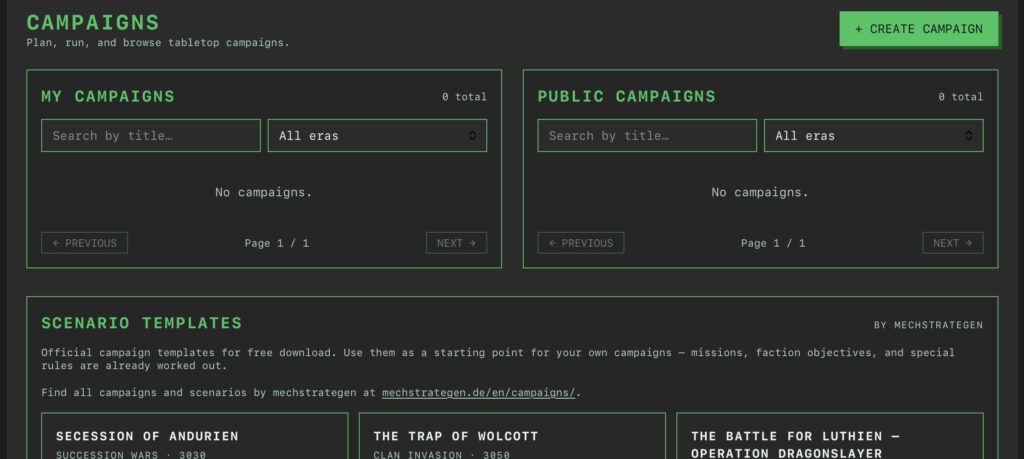
A single battle is fun, but it only gets really exciting when the losses from the last battle directly affect the next encounter. With the new Campaigns module, you can now manage ongoing campaigns with multiple missions right in the app.
Screenshot
How does it all work?
Create a campaign: You define the basic information, such as the title, time period, and description, and can even upload an optional PDF briefing. You also set the maximum PV pool size.
Two factions, two Force Lists: Each campaign is played out between exactly two opponents. You assign one of your existing Force Lists—one that fits the era—to each faction.
Cutting & Independence (Snapshot): As soon as the campaign starts, the system locks the units from the Force Lists into a separate campaign pool. Subsequent changes to your global lists will no longer affect the ongoing campaign.
Logistics (Repair Kits & Cooldown): You decide in advance how many repair kits each player may use between missions and how many missions a destroyed unit must sit out (cooldown) before it can return to the field once repaired.
The Mission Cycle
Each mission goes through three phases: Setup (squad selection based on max HP), Running (the battle itself), and Completed (recording the results). The system tracks the status of your lances (available, damaged, destroyed, on cooldown) across multiple game nights. At the end of a campaign, the app provides you with a neat summary of all victories, missions, and remaining units.
🎁 Scenario Templates by mechstrategen: To help you get started, you can now find official scenario templates I’ve created on the Campaigns page as a German PDF download. They include pre-made mission objectives, faction objectives, and special rules!
2. Color Scheme Generator – Perfect Color Palettes for Your Mechs
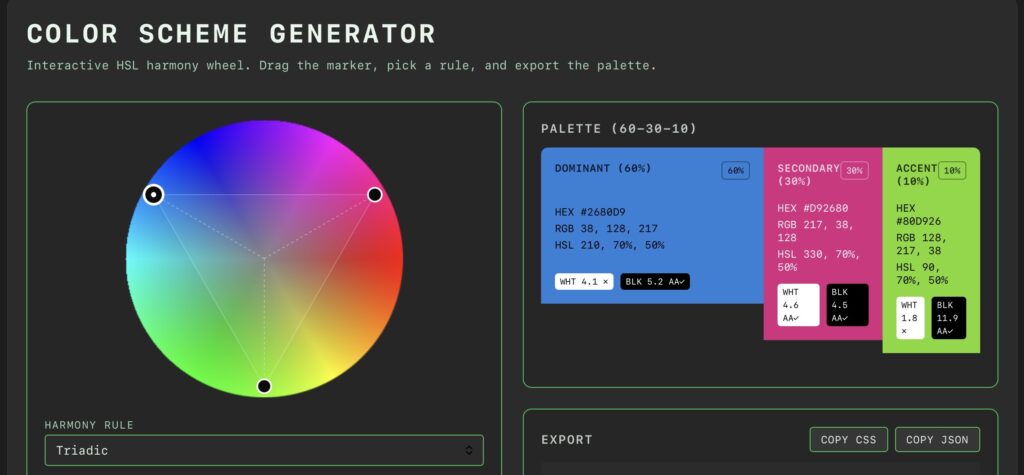
It’s a feast for the eyes! In keeping with the hobby aspect, I’ve integrated the Color Scheme Generator directly into the dashboard. This lets you create harmonious color palettes for your miniatures without having to go to external websites.
Screenshot
Interactive HSL Color Wheel: Select your base color directly on the wheel and easily adjust the saturation and brightness using the sliders.
Classic Harmony Rules: Click to switch between monochromatic, analogous, complementary, split-complementary, and triadic. The wheel immediately shows you the corresponding connecting polygon.
The 60-30-10 Rule: The calculated palette is divided directly according to the ratio proven in model building: Dominant (60%) for the primary armor, Secondary (30%) for accent panels, and Accent (10%) for lenses, cockpit windows, or warning stripes.
Contrast & Code Export: The built-in contrast checker (including an anti-aliasing note for white/black) shows you whether text remains legible. You can also copy the palette directly to the clipboard as CSS variables or JSON (with HEX, RGB, and HSL values).
3. AS Play Mode – Interactive Playing Cards for the Table
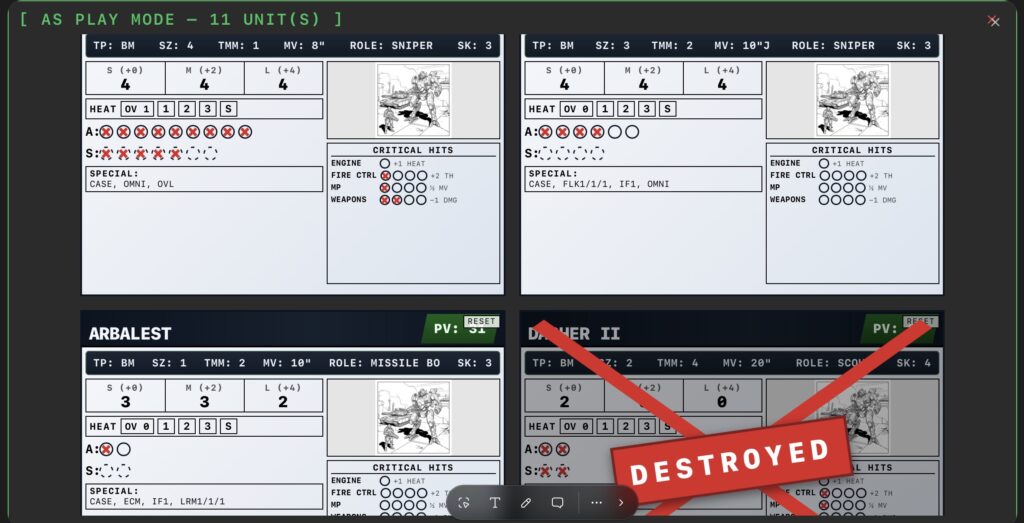
If you’d rather not use paper cards or card sleeves when playing Alpha Strike, the new AS Play Mode is just the thing for you. You can access it via the new [AS PLAY MODE] button on the details page of each Force List. The mode opens as an optimized full-screen dialog that adapts perfectly to laptops or tablets.
Screenshot
Full Control in Combat:
Armor & Structure: Simply click on the armor points (A) or structure points (S) to reduce damage from left to right. Clicking on a point that is already marked resets the damage starting from that point.
Heat: Manage the heat levels (1, 2, 3, and S for Shutdown) of your BattleMechs. Only one level is active at a time; the system automatically switches levels when you click.
Critical Hits: Record critical hits specifically for Engine, Fire Control, Weapons, or MP/Motive. The system follows these rules: A second engine hit on a Mech results in destruction. Combat Vehicles, accordingly, have only one engine pip and a three-tiered Motive track (-2 MV, ½ MV, 0 MV). Infantry automatically ignores this section.
Destruction Banner: As soon as a unit is considered destroyed based on its points or critical hits, a prominent red “DESTROYED” banner appears on the map. This helps you keep track of the action even during large battles.
Try it now!
The update is now live on The Tactical Screen. As usual, creating campaigns requires a free account, while viewing public campaigns, the Color Scheme Generator, and AS Play Mode are available to everyone.
What do you think of the new features? Have you tried out Play Mode at the gaming table yet? Send me your feedback!
Sören, your host and author of mechstrategen What do you think of the new logistics options for the campaigns—do you prefer playing with strict cooldowns, or do you repair your Mechs to full health right away?
Transparency notice on the use of AI (in accordance with the EU AI Act): The content of this blog is personally conceived, researched and defined by me. I use generative artificial intelligence to help me formulate and structure the texts.
Why? This enables me to prepare complex issues more precisely and to focus fully on the quality of the content and research. The final editorial control and responsibility for all published content lies solely with me.
Together for better content!
This blog is a project of the heart that can only continue to grow with your help. Every comment, every recommendation – and especially your financial support – secures the future of this platform.
Do you want this content to remain freely accessible?
This is how you can support the mission:
NEWSLETTER REGISTRATION:Become part of the fast-growing community and never miss an update again!
BECOME A PATREON MEMBER: Join the inner circle and get access to exclusive material and early releases.
OTHER SUPPORT:Whether it’s a donation, sharing a post or recommending the blog to others – every form of support counts!
Let’s make this blog an even better place together!
Ich bin Sören Spieckermann, der Kopf hinter mechstrategen. Seit Jahren faszinieren mich taktische Tabletop-Schlachten und die strategische Tiefe von Mechs. Ob schnelle Gefechte in Halo: Flashpoint oder epische Schlachten bei BattleTech Alpha Strike – hier teile ich meine Erfahrungen und Taktiken mit dir. Mein Ziel? Sowohl Einsteigern den Start zu erleichtern als auch alten Hasen neue Impulse für das nächste Match zu geben.
Clan or Inner Sphere? Doesn't matter - everyone needs to see this. Sharing is the true Mech Warrior code!