No More Frustration When Building Lists: How the Generators on The Tactical Screen Save You Time and Stress
I know this all too well: The next game day is fast approaching, the dice are packed, the terrain is set up—but the army list is still missing. So I sit down at my desk, flip through the Master Unit List, compare point values (PV), check formation types, cross out chassis, do the math… and before I know it, an hour has gone by before my force is even remotely set.
This is exactly where the three new generators on The Tactical Screen really come in handy. They take care of the most tedious part of the hobby for us: In just a few seconds, they put together a fully playable, rules-compliant army that perfectly matches your chosen era, faction, and point budget.
The best part? You don’t end up with a random hodgepodge. Anything that didn’t exist historically in your era won’t appear. The generators strictly adhere to the formation rules—duplicate mechs in the same formation are avoided, while vehicles or fighter jets may appear multiple times in accordance with the rules.
Here, you’ll learn how the three tools work and how to make the most of them in your next battles.
1. Generate Force: Your entire army at the push of a button
Who is this tool for?
For registered users—you can find this feature right on your dashboard under “My Force Lists.”
Here’s how it works in practice
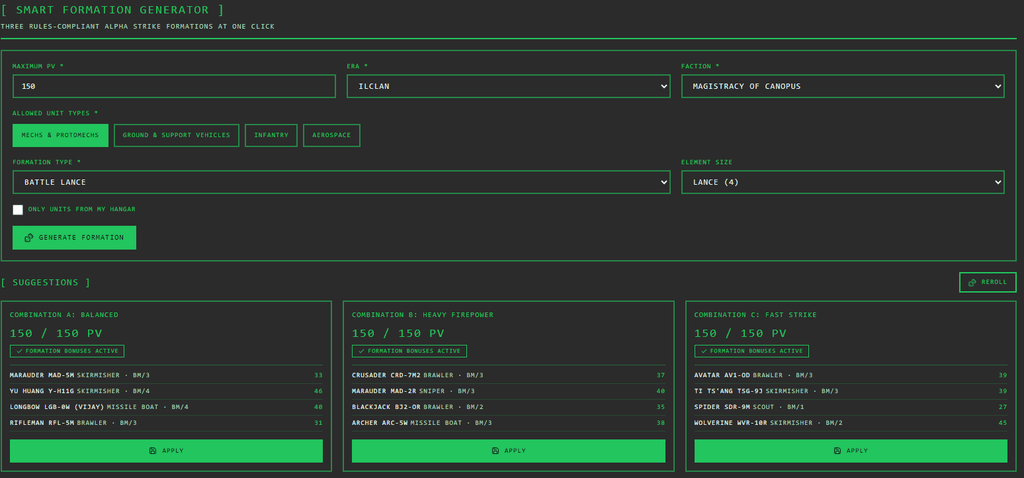
The Force Generator is the tool for you when you need a complete list quickly. Just set the parameters and let the app do the work:
- Select an era and faction: For example, ” Clan Invasion ” as Clan Jade Falcon.
- Set the target points: About 350 points for an evening game.
- Limit unit types: Just Mechs, or a mixed force of Mechs, vehicles, and Battle Armor? You decide.
- Optional (“Include Hangar”): My personal favorite! If you enable this option, the generator will build the list exclusively from the chassis already in your physical collection.
Before saving, an overview shows you the breakdown by type, size, and total value. If you’re not satisfied with a particular combination, just click “Regenerate”—without having to re-enter all the parameters.
My Tactical Advantage
Is game night just around the corner and you need a workable list in 30 seconds? Or are you looking for some fresh inspiration for your usual squad? That’s exactly what this generator is for. Instead of spending half an hour crunching numbers, just click once and you’ll have a ready-made force that’s guaranteed to complement your painted miniatures in the display case.
2. Generate Formation: Rule-compliant building blocks without scrolling
Who is this tool for?
For registered users—integrated into the dashboard right when you’re creating your lists.
Here’s how it works in practice
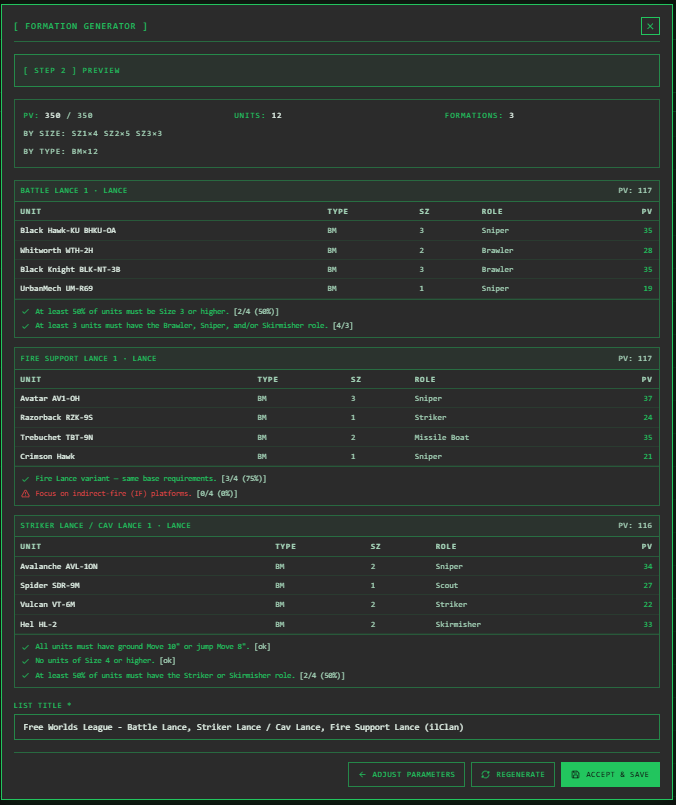
While the Force Generator builds the entire list, the Formation Generator takes care of the individual building blocks within it (e.g., Lances, Stars, or special formation types). You define the structure (e.g., two Lances and one Star), and the app fills it in.
Especially ingenious: The generator supports both rule systems:
- Alpha Strike (PV): Balancing via Point Values.
- Classic BattleTech (BV): Balancing via Battle Values.
If a formation bonus doesn’t perfectly align with your specifications, the tool will clearly alert you to this in the preview instead of presenting you with a formation that violates the rules.
My Tactical Advantage
We’ve all been there: minimum sizes, allowed roles, bonuses—looking up formation rules takes time. The Formation Generator knows all the rules by heart. It’s perfect if you want to build a specific scenario (e.g., a fast Recon Lance for a reconnaissance scenario) or expand your campaign forces step by step.
3. Smart Formation: Three Suggestions in One Go (No registration required!)
Who is this tool for?
For everyone! Both guests and registered users can access the tool directly via the menu item Tools – “Smart Formation” .
Here’s how it works in practice
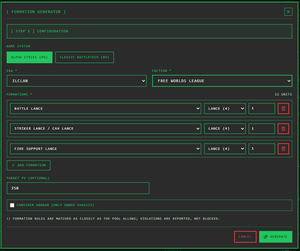
The Smart Formation Generator is the platform’s driving force, and it doesn’t even require an account. It doesn’t just give you one option—it presents you with three different tactical approaches right away:
- Combination A (Balanced): The all-around team for any situation.
- Combination B (Firepower): Maximum damage at a distance.
- Combination C (Rapid Response Team): High mobility for quick mission objectives.
You select the era, faction, and PV limit, and you’ll immediately see whether the necessary formation bonuses are active. Don’t like your selection? Just click “Reroll”!
Guests can test and roll the dice as much as they like. If you’d like to save your results or link your own hangar, you can register for free at any time.
My Tactical Advantage
Try it out risk-free in two minutes! Even for me, as a veteran player, the triple selection is worth its weight in gold: I don’t have to spend a long time figuring out which tactical focus to choose; instead, I can compare three ready-made strategies side by side on the screen.
An Overview of the Generators
| Function | No registration required | With free registration |
| Smart Formation | Generate suggestions & reroll with dice | + Save, add to lists, include in hangar |
| Generate Force | — | Create & Save a Complete Force List |
| Generate Formation | — | Create Individual Formations (Alpha Strike & Classic) |

Bottom line: More time for the actual game
At the end of the day, we all want the same thing: to move miniatures, roll dice, and fight epic battles. The three generators on The Tactical Screen take care of exactly the part that takes up the most time.
Whether it’s the quick, comprehensive list with “Generate Force,” the rule-compliant fine-tuning of individual lances with “Generate Formation,” or the flexible comparison feature with “Smart Formation” —all three tools are precise, historically accurate, and extremely time-efficient.
The best thing to do is try it out for yourself: Open the Smart Formation Generator, select your favorite faction, and see what the tool comes up with!
Transparency notice on the use of AI (in accordance with the EU AI Act):
The content of this blog is personally conceived, researched and defined by me. I use generative artificial intelligence to help me formulate and structure the texts.
Why? This enables me to prepare complex issues more precisely and to focus fully on the quality of the content and research. The final editorial control and responsibility for all published content lies solely with me.
Together for better content!
This blog is a project of the heart that can only continue to grow with your help. Every comment, every recommendation – and especially your financial support – secures the future of this platform.
Do you want this content to remain freely accessible?
This is how you can support the mission:
- NEWSLETTER REGISTRATION: Become part of the fast-growing community and never miss an update again!
- BECOME A PATREON MEMBER: Join the inner circle and get access to exclusive material and early releases.
- OTHER SUPPORT: Whether it’s a donation, sharing a post or recommending the blog to others – every form of support counts!
Let’s make this blog an even better place together!

Ich bin Sören Spieckermann, der Kopf hinter mechstrategen. Seit Jahren faszinieren mich taktische Tabletop-Schlachten und die strategische Tiefe von Mechs. Ob schnelle Gefechte in Halo: Flashpoint oder epische Schlachten bei BattleTech Alpha Strike – hier teile ich meine Erfahrungen und Taktiken mit dir. Mein Ziel? Sowohl Einsteigern den Start zu erleichtern als auch alten Hasen neue Impulse für das nächste Match zu geben.