The Tactical Screen November Update: OpFor Generator, Era Dossier, and Safe-Buy Advisor!
What an incredible month for all the commanders of BattleTech Alpha Strike and Halo: Flashpoint! I’ve spent countless hours behind the controls over the past few weeks to Treally beef upthe Tactical Screen and provide you with new, data-driven tools.
We’ve all been there: You’ve put together your dream squad, and you’ve calculated the points down to the last detail—but what about finding a well-matched, thematically appropriate opponent for a spontaneous skirmish, a demo game, or a solo campaign? Or how do I know, before buying miniatures, which sets offer the best value for my budget?
The November update answers exactly these questions! Today, I’ll be introducing the new OpFor Generator, the in-depth Era Dossier, and the Safe-Buy Advisor in detail.
Due to the upcoming Phoenix Con , this update will be released at the end of October—but, as is tradition, it will still be called the November Update!
- The Tactical Screen November Update: OpFor Generator, Era Dossier, and Safe-Buy Advisor!
- The OpFor Generator—Your Perfect Sparring Partner at the Push of a Button
- The dossier “The Backbone of the Ages”
- Match-Up Analysis 2.0: Your Battle Strategy Before the First Roll of the Dice
- EXECUTIVE MATCH-UP BRIEFING: Your Tactical Battle Plan at a Glance
- TARGET PRIORITY & ASYMMETRY MATRIX: Who Must Fall First?
- HARD COUNTER & TECH CHECK MATRIX: No Unpleasant Surprises
- How does this help you before the match?
- Conclusion & Give It a Try
- 1. PV Density Distribution: Say Goodbye to “Top-Heaviness”
- Your Tactical Advantage
- 2. Lance Potential: What formation bonuses are immediately available to you?
- Your Tactical Advantage
- The "Safe Buy" Collection Advisor
- Other Highlights of the Update
- My Conclusion
- Gemeinsam für besseren Content!
The OpFor Generator—Your Perfect Sparring Partner at the Push of a Button
From now on, you’ll never have to struggle to come up with an opposing force out of thin air again. With just one click on your Force details page, the system analyzes your forces and compiles a list of evenly matched opponents for you.
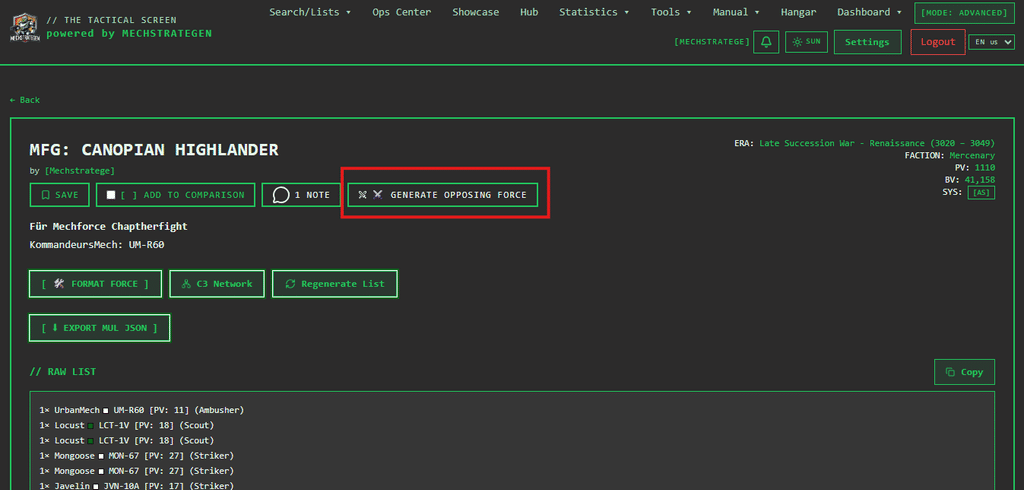
How the generator reflects your team:
- Historical & Canonical Accuracy: The era, point limit (PV), and composition of unit types are automatically applied. If you select a rival faction, the system will only offer you factions that were historically active during the era of your list. Alternatively, you can let fate decide through a random selection.
- Tactical balance instead of a storm-mech wall: The Generator doesn’t build a soulless wall of 100-metric-ton units, but rather is based on the size class profile (Size 1 through 4) of your own list. Thanks to intelligent formation rules, you’ll always get tactically sound lances, stars, or Level II formations—guaranteed to be rules-compliant, balanced, and ready for action right away.
- Hangar Integration: Do you play at your own table with your own miniatures? Just enable the Hangar filter, and the generator will only use the models you’ve already registered in your personal hangar on The Tactical Screen!
The specific benefits, in a nutshell:
- Game setup in seconds: No more poring over tables—in less than 5 seconds, you’ll have a fair, perfectly balanced matchup for the next game day.
- Perfect for demo rounds & guests: If you’re providing miniatures for fellow players, you can generate two balanced lists from your own hangar in the blink of an eye, using actual miniatures you already own.
- Realistic tactics instead of min-maxing: Thanks to formation rules (at least one combat formation such as Battle/Striker/Fire, and at most one Support Lance) and the balancing of size classes, the generated opponents feel like real military units.
- Clear Documentation: If your list is public and you also share the opponent’s list publicly, both are automatically linked to each other as a campaign or match pairing.
Try it out right now: Open one of your saved lists and start generating your opponent using [ ⚔️ GEGNER-LISTE GENERIEREN ].
The dossier “The Backbone of the Ages”
Which BattleMechs and combat vehicles truly shaped the Inner Sphere—and which models have remained true classics throughout all 12 eras?
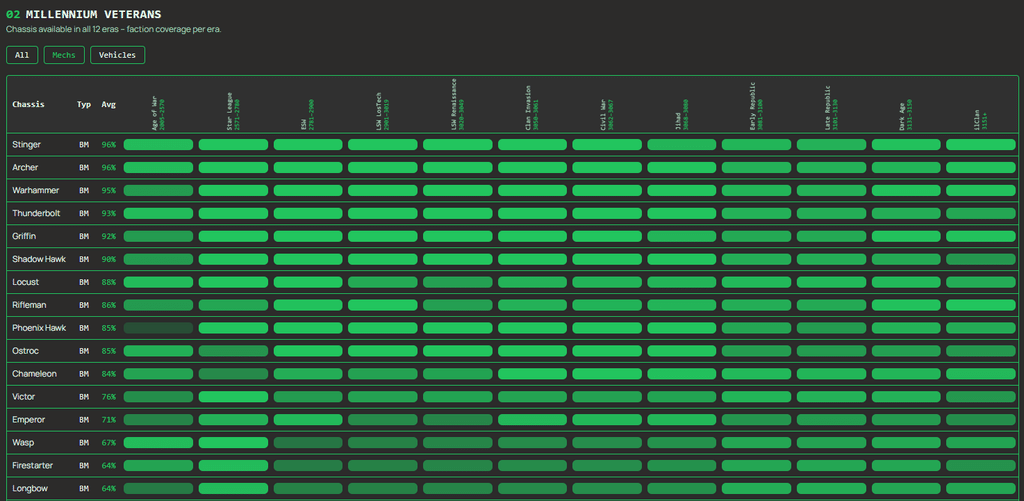
Under “The Backbone of the Eras” (below “Statistics” in the menu), you can now access a data-driven analysis of the entire BattleTech timeline (from the Age of War to the ilClan era).
Important clarification regarding the data source: I am drawing on our own internal database, The Tactical Screen. This database is periodically and automatically synchronized in the background with the official availability data from the Master Unit List (MUL) to ensure an exact, canonical match for over 290,000 entries.
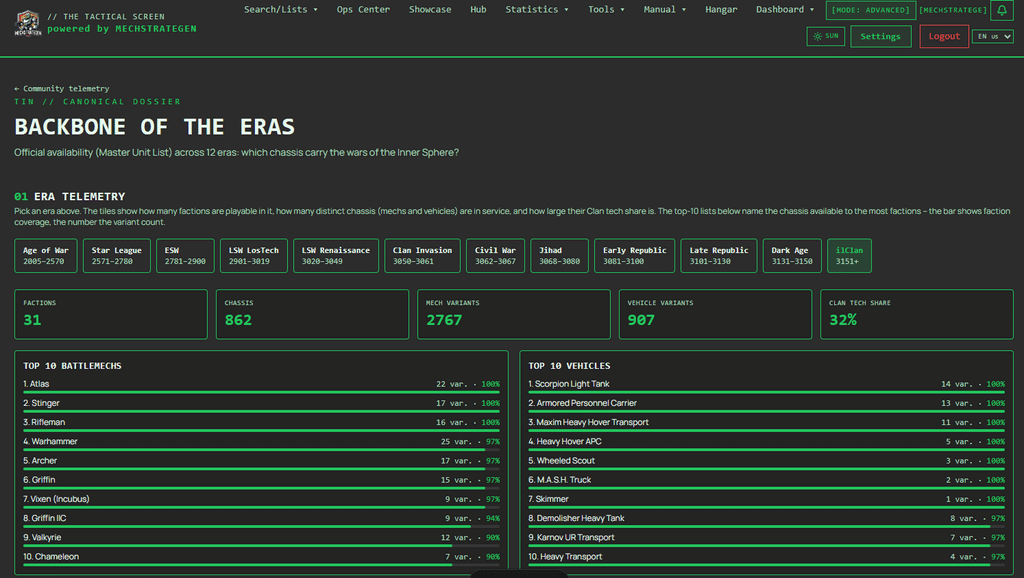
The specific benefits for you:
- Smart Miniature Purchases (“Safe Buy”): Before you invest money in new Mechs or Lances, you can see at a glance which chassis are available to nearly every faction. Models with broad faction coverage are the safest investment for your real-world tabletop collection, since you can use them in almost any scenario.
- Historically accurate list-building without lengthy searches: The Epoch Telemetry breaks down, for each epoch, how many playable factions exist, how many chassis were actively in service, and what percentage of clan technology is present. The Top 10 lists immediately show you which units formed the core of each time period.
- Discover the “Millennium Veterans”: Find the true immortals of the BattleTech universe—chassis that have been available without interruption throughout all 12 eras (from workhorses like the Shadow Hawk or Wasp to indispensable transport tanks).
- Seamless link to the gallery: Every chassis and every era cell in the Veterans table is interactive: A single click opens the unit gallery directly with the filter already applied. You’ll immediately see the specific values for Alpha Strike and Classic BattleTech without having to set the filters manually.
Here is a ready-to-publish blog post for Mech Strategists and the News section of The Tactical Screen, which highlights the specific in-game benefits for tabletop and Alpha-Strike commanders:
Match-Up Analysis 2.0: Your Battle Strategy Before the First Roll of the Dice
Anyone can compare unit profiles. But how does your force really stack up against your opponent’s list? With the latest update to the comparison view on The Tactical Screen, we’re taking list-building to a whole new tactical level: Three new analysis tools provide you with crystal-clear orders of battle, prioritized kill lists, and a ruthless tech check.
Anyone who’s ever flown an expensive C3 Lance into an enemy ECM bubble in Alpha Strike, or had to watch their heavily armored Brawlers get worn down by fast Jumpers in open terrain for round after round, knows: Battles aren’t won on the point scale, but in the match-up.
To uncover precisely these asymmetries before the first activation marker, we’ve expanded the comparison view (/comparison) with three highly precise modules:
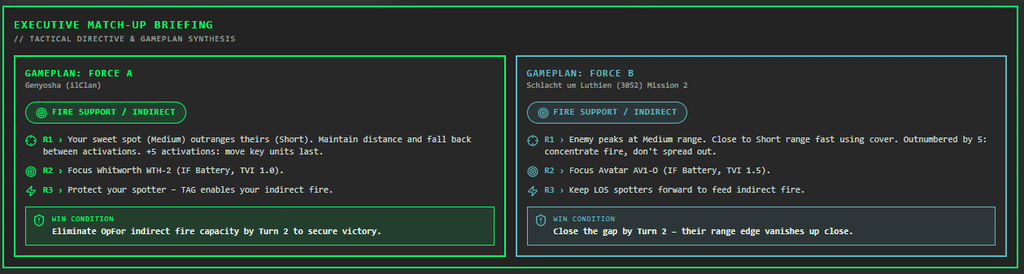
EXECUTIVE MATCH-UP BRIEFING: Your Tactical Battle Plan at a Glance
Right at the top of the comparison view, you’ll now see the Executive Match-Up Briefing in a striking cyberpunk HUD style. Instead of manually scanning through dozens of raw data points, the system distills both lists into a simultaneous dual briefing.
Primary Objective: The system automatically determines the dominant mission of both forces—such as “Kiting / Range Control,” “Aggressive Brawl,” “Fire Support / Indirect,” or “Mid-Range Zone Denial”*.
- Tactical Guidelines:
- Movement & Range: Who has the range sweet spot? Do you need to maintain your distance, or use cover to close in by Round 2? Do you have an activation advantage (+X activations) to bring your key mechs in at the very end?
- Fire Focus: Which key enemy unit must be neutralized in Round 1?
- Tech & Synergies: Specific guidance on how to strategically position your own special abilities (e.g., ECM against C3, TAG spotter for indirect fire).
Win Condition: A concise, unambiguous victory condition (e.g., “Destroy the C3 node unit before Round 2 to cause the enemy network to collapse”*).
The benefit for you: In less than 10 seconds before the match, you’ll know what playstyle your list excels at, what range you’ll need to fight in, and what critical mistake you absolutely must not make against this specific lineup.
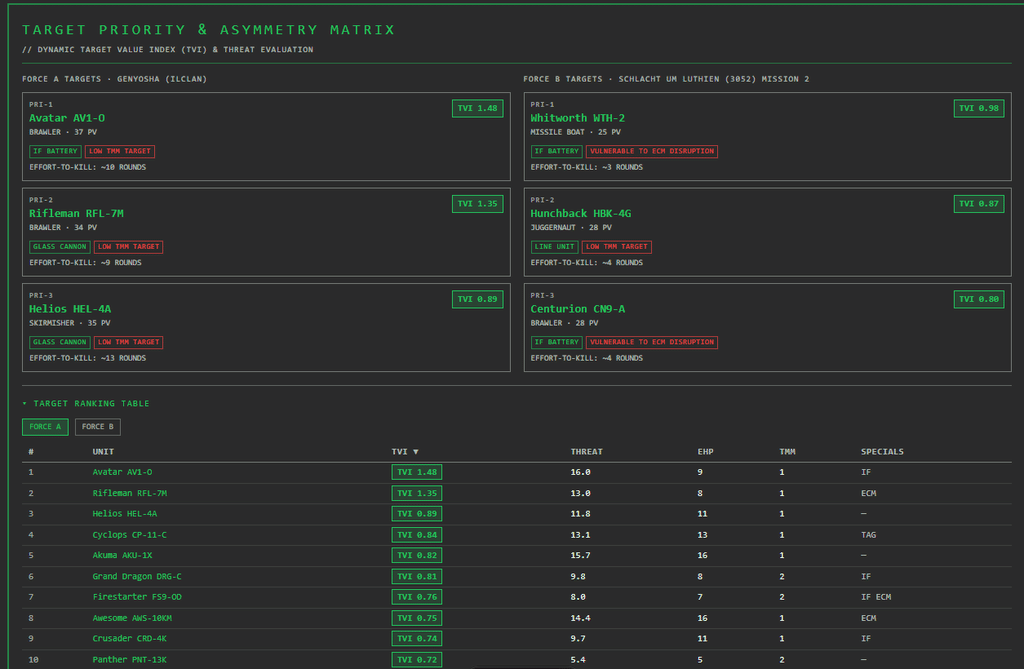
TARGET PRIORITY & ASYMMETRY MATRIX: Who Must Fall First?
In the heat of a tabletop battle, it’s often hard to decide: Should I fire at the 60-HP colossus or the nimble scout? The Target Priority & Asymmetry Matrix answers this question with mathematical precision using the Tactical Value Index (TVI):
TVI ={Threat Potential ( Firepower + Synergy Bonuses) / Survivability (EHPxTMM Factor)}
For each enemy unit, the system calculates:
- TVI Value: Which target offers the highest strategic return per damage point invested?
Tactical Role Detection: Automatically identifies units as “Glass Cannon” (brutal damage, low armor), “Key C3 Node,” “TAG Spotter,” or “High-Value Target”*. - Effort-to-Kill (ETK or EHP): Calculates, based on the 2D6 hit probabilities of your average skill level and the target’s TMM, how many rounds of concentrated fire your force would realistically need to take out that unit.
The benefit for you: No more relying on gut feelings when calling out targets! You’ll instantly spot enemy glass cannons that can be taken down with an early Alpha Strike before they can fire their weapons—and identify C3 or TAG nodes whose destruction will cripple the enemy’s entire infrastructure.
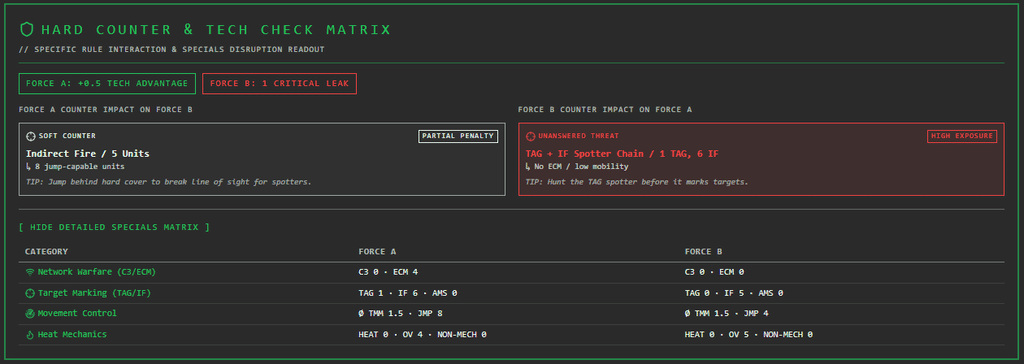
HARD COUNTER & TECH CHECK MATRIX: No Unpleasant Surprises
BattleTech Alpha Strike thrives on special abilities—and their ruthless counters. The Hard Counter & Tech Check Matrix scans both lists for interactions in four core areas: networking (C3/ECM), Tagging (TAG/Indirect Fire/AMS), Mobility (TMM/Jumpers/Pilot Skills), and Heat (HT/Non-Mech Immunities).
The system color-codes each threat:
- 🟢 Hard Counter: You have the perfect countermeasure at your disposal (e.g., ECM against C3, AMS against indirect LRM fire, or heat-immune combat vehicles against flamethrowers).
- 🟡 Soft Counter: Partial mitigation (e.g., light ECM, high TMM against markings, or jump jets to take advantage of cover).
- 🔴 Critical Leak / Unanswered: The opponent fields a technology against which your list is completely defenseless.
At the top, a Net Tech Score summarizes whether your list has an overall technological advantage or contains risky security vulnerabilities.
The benefit for you: You’ll spot blind spots as soon as you start putting together your list. In the heat of battle, you’ll immediately see which units to position as a shield and where you can catch your opponent off guard.
Luck of the Dice or Ice-Cold Consistency? The New Force Volatility Matrix
Every tabletop commander knows this feeling: On paper, your army list looks unstoppable—but on the battlefield, all it takes is two bad dice rolls or the early loss of a key unit, and your entire battle plan falls apart. Another list, on the other hand, easily forgives mistakes and reliably deals damage round after round.
This is exactly where our new Force Volatility & Variance Matrix comes in, in the comparison view of The Tactical Screen. It shows you, before you make your first move, just how stable or risky two lists really are when compared side by side.
How does this help you before the match?
- Recognize your true playstyle at a glance
Does your team rely on many solid hits throughout the round (Consistent Grinder), or does your victory hinge on risky all-in moments (High-Stakes Striker)? The matrix instantly shows you how vulnerable a list is to bad dice rolls—both for you and your opponent. - Revealing Your Own Achilles’ Heel
What happens if your most important mech bites the dust in Round 2? The analysis ruthlessly reveals just how much your firepower plummets in the event of a targeted loss. This way, you’ll know right from the deployment phase which units you must protect at all costs and which losses you can afford to take. - Range Check for Your Battle Plan
Not every unit fights with the same consistency at every range. With a single click to switch between close, medium, and long range, you can immediately see at which range your list maintains maximum control—and where you should lure your opponent.
Conclusion & Give It a Try
The new matrix won’t do the rolling with dice for you, but it gives you tactical confidence: You’ll know exactly whether you can play for time and methodically wear down your opponent, or whether you need to strike aggressively before your key models come under fire.
👉 Try it now: Just load two lists into the comparison view and scroll down to the new volatility matrix!
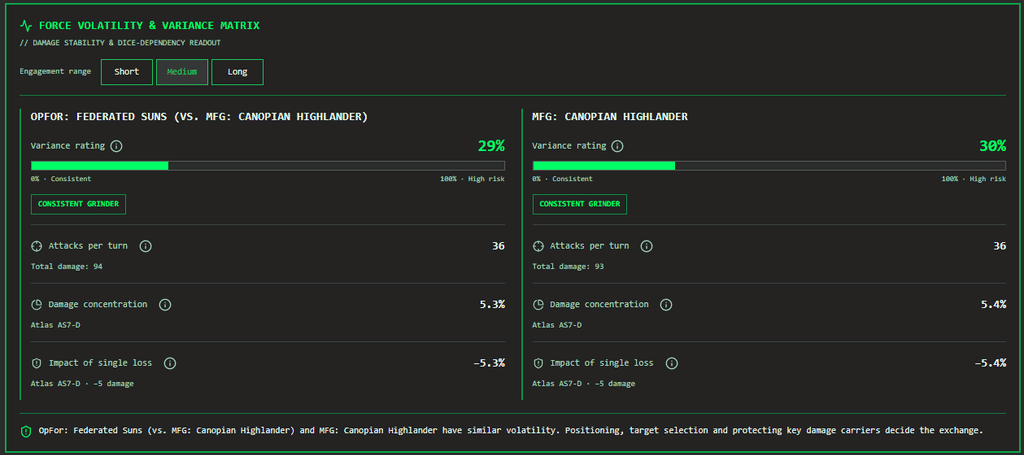
The four new analysis tools are now live on The Tactical Screen! Simply select two Alpha-Strike lists from your list overview and click “Compare” to generate your first Executive Briefing.
Tactical Hangar Analysis: Discover the True Potential of Your Miniature Collection
From the display case straight to the mat: Two new analysis tools in “The Tactical Screen’s” Digital Hangar now show you in black and white just how balanced your collection really is—and which legal Alpha Strike Lances you can immediately lead into battle with your painted models.
Anyone who plays Battletech: Alpha Strike is familiar with this phenomenon: The shelves fill up with plastic and tin, but when it’s time to build a list before the next game night, the same question always comes up: “Do I actually have enough affordable activation units to keep from giving up the initiative without a fight? And what actual formation bonuses can I actually field with my painted models?”
This is exactly where the two new HUD analyses in the Digital Hangar come in. Located directly below the familiar tonnage distribution, they provide you with immediate clarity on the cost structure and tactical value of your fleet.
1. PV Density Distribution: Say Goodbye to “Top-Heaviness”
In Alpha Strike, battles are rarely won by the sheer firepower of heavy icons alone—often, initiative, activation order, and securing mission objectives are what decide the outcome. A common pitfall when building a collection: You unknowingly accumulate heavy Prestige Mechs while lacking flexible units in the mid- and low-point segments.
The new PV density histogram clusters your entire collection across five key point-value corridors:
- < 15 PV (Ultra-Light / Swarm): Pure activation fillers, scouts, and infantry.
- 15–25 PV (Activation & Line Base): The backbone of any list that relies on activation advantages.
- 26–35 PV (All-Rounders): Medium-weight workhorses with a solid balance of survivability and firepower.
- 36–45 PV (Heavy Hitters): High-impact core models that set the pace of the battle.
- > 45 PV (Prestige / Assaults): Massive point-scoring behemoths—game-changers, but losing them carries a high risk of losing focus.
Your Tactical Advantage
One look at the bar chart will tell you right away:
- Collection Balance at a Glance: Do you have enough operational flexibility to fill a fixed PV limit (e.g., 250, 350, or 450 PV) in a balanced way?
- Targeted Purchase Decisions: If you spot a gap at 15–25 PV, you’ll know exactly what to look for before your next box purchase, instead of blindly adding the next Assault Mech to your hangar.
Good to know: The histogram takes your entire collection into account—whether a model is still in its original box, primed and waiting on the painting table, or fully painted. This gives you an overview of your entire collection.

2. Lance Potential: What formation bonuses are immediately available to you?
Alpha Strike truly reveals its strategic depth with the official Lance formations and their special rules: lucky rerolls for Battle Lances, critical hit chances for Fire Lances, or movement tricks for Striker Lances. But with 40, 80, or 150 Mechs, who can keep track of which official formations your ready-to-play miniatures actually qualify for?
The Lance Potential Analysis automatically filters your hangar to show all units with the “Ready for tabletop” status and calculates the theoretical maximum number of full lances (4 units) that can be fielded based on the official role and tonnage specifications:
- Battle Lance: Sturdy Brawlers, Snipers, and Skirmishers—the classic choice for intense firefights.
- Striker Lance: Fast-moving assault units (Skirmishers, Strikers, Brawlers), ideal for flanking maneuvers.
- Fire Support Lance: Missile Boats and Snipers for reliable fire support from a distance.
- Recon Lance: Scouts and agile reconnaissance units to control the battlefield.
- Assault Lance: Heavy breakers (Juggernauts, Brawlers, Snipers) to break through enemy lines.
- Pursuit Lance: Chasers and hunters to intercept isolated enemies.
Your Tactical Advantage
- From the shelf to the game board in seconds: You can immediately see which playstyle your finished miniatures support—no prep time needed—perfect when you need a new list on short notice.
- Motivation for the paint table: Are you just one Scout short of unlocking a third play-ready Recon Lance? The analysis shows you exactly which model from your “Unopened” or “Primed” box deserves a coat of paint next.

The “Safe Buy” Collection Advisor
Never buy miniatures again that just end up gathering dust in a closet! Every tabletop commander knows the problem: A box looks fantastic on the shelf—but how often does it actually make it onto the table with your factions and favorite heroes? And which ForcePack gives you the best value for your gaming table?
Starting now, our new Safe Buy Advisor (available in the menu under ” Suche / Listen → Safe Buy“) will help you make data-driven, future-proof purchasing decisions. The tool synchronizes with the database in real time and calculates an exact distribution score (0–100%) for every chassis and every box set:
- 🟢 Extremely Reliable (> 80%): True all-rounders (such as the Atlas, Stinger, or Hetzer) that almost any faction can field. A no-brainer for any collection.
- 🟡 Solid Standard (40–80%): Reliable workhorses of major faction blocs (e.g., typical Inner Sphere House mechs or Clan standards).
- 🔴 Niche Specialist (< 40%): Characterful collector’s items for very specific Lore-based forces.
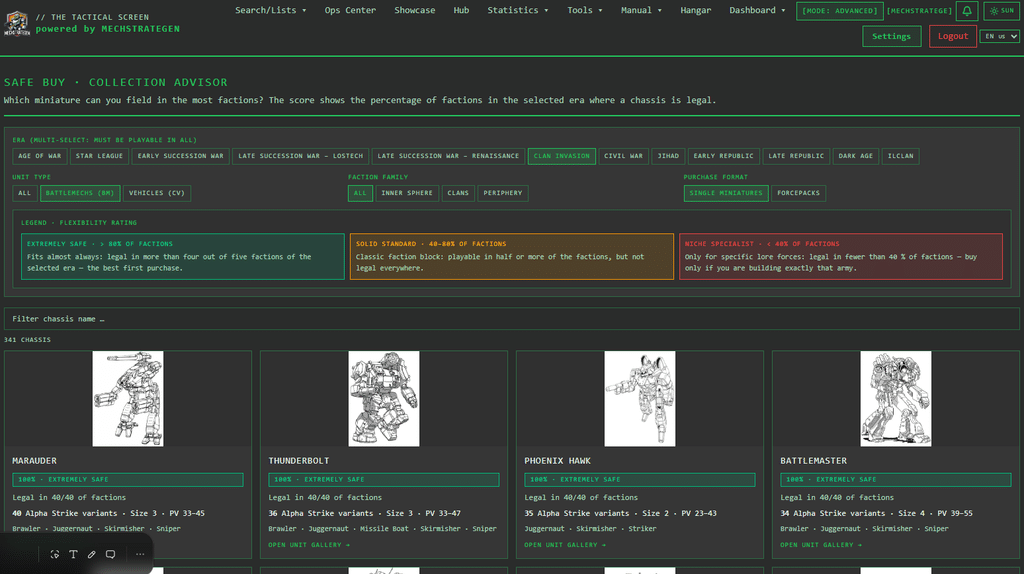
Your features in the Collection Advisor:
- Testing Era Combinations: Want to build a lance that you can use seamlessly from the Succession Wars era(3025) all the way to the present day in ilClan? Just select both eras—the Advisor will show you only units that are legal in both eras.
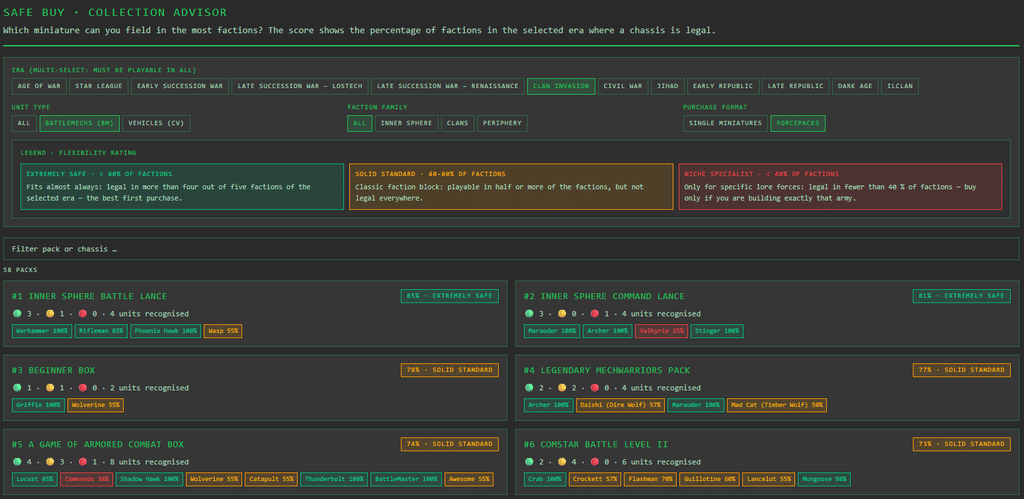
- Rate Official Catalyst ForcePacks: Switch to ForcePacks and instantly see the rankings of all 60+ box sets: Which box set contains the most versatile models? Which box set is the best value for beginners?
- A Glance at the Variety of Variants: Find out right away how many different Alpha Strike cards are available for a single model. A chassis with 12 variants (ranging from a close-quarters brawler to a sniper) gives you significantly more flexibility in gameplay than a model with just a single card.
- Lightning-Fast Search: Are you looking for a specific box, or do you want to know which ForcePacks contain a Timber Wolf or a Hunchback, for example? The built-in live search filters boxes and individual miniatures in the blink of an eye.
Canon Color Schemes: The New Template Catalog with Over 1,200 Units
From the Davion Heavy Guards to the Wolfspider Keshik to the smallest mercenary unit: With the new template catalog on The Tactical Screen, you can now find the right historical color scheme for your BattleTech and Alpha Strike miniatures in no time—based on data from CamoSpecs Online.
We’ve all been there: A new ForcePack is sitting on the paint table, the mechs are deburred and built—but how exactly were the machines of the 10th Lyran Guards, the 2nd Sword of Light, or the Black Widow Company painted in *Clan Invasion*?
Until now, that meant combing through dozens of forum threads, poring over old sourcebooks, or clicking through confusing lists of links. Not anymore!
Over 1,200 regiments and units at your fingertips
Under Tools → Color Schemes → Template Catalog, you now have access to an extensive archive containing over 1,200 official units and regiments. The template catalog is based on data from Camo SpecsOnline.
- Historical Color Descriptions: For each unit, you’ll find a concise summary of the primary and accent colors, as well as a detailed description of the typical paint scheme.
- Smart Era & Faction Filters: Planning a Lance for the Succession Wars or a Trinary for the ilClan era? Simply select your era, and the faction filter will automatically show you only units that were actively in service during that time.
- Regimental and Faction Insignia: With hundreds of units to choose from, you’ll immediately see the official unit logo or the coat of arms of the parent faction.
- Direct link to CamoSpecs: Clicking “View on CamoSpecs” takes you straight to the photo gallery for that unit, where you can see real, masterfully painted miniatures for inspiration.
- Fully bilingual (DE / EN): Whether you use the app in German or English, all color descriptions and filters adapt seamlessly.
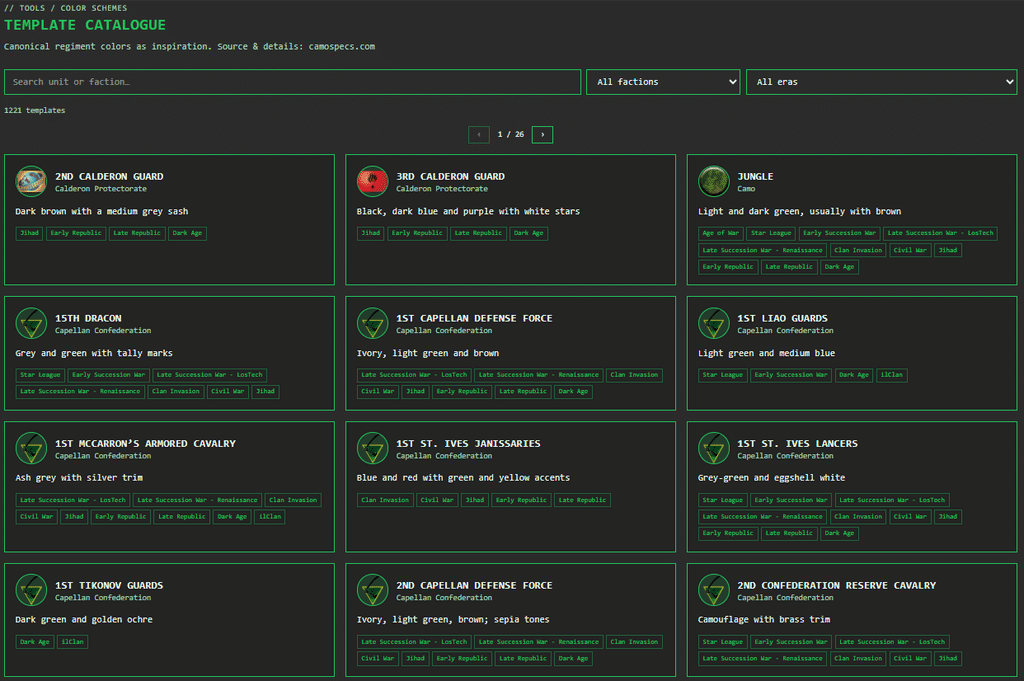
From the Template Catalog Straight to the Painting Table
The template catalog is the perfect complement to your personal color schemes and the Digital Hangar: Look up the canonical color scheme for your desired unit, convert the color palette to your personal color recipe using your preferred acrylic, Contrast, or metallic paints, and link it directly to the miniatures in your Hangar. This way, you can keep track of your painting progress and color recipes for every project.
👉 Try it out right away: You’ll find the catalog in the main menu under Tools → Color Schemes → Template Catalog (or directly at /tools/colors/templates)
Other Highlights of the Update
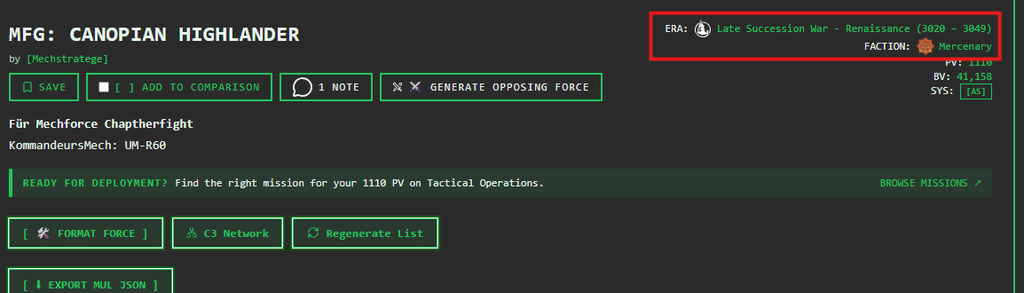
Visual Identity Through MUL Faction & Era Emblems
When assembling a force, it’s not just about point values and armor—every Force List tells a story. The system now automatically displays the corresponding faction logos and era icons directly in your list’s detail view.
- Clear at a glance: A quick look at your tablet immediately shows your house/clan’s crest and the era symbol.
- Perfect for communities and tournaments: Your printed or shared rosters look just like a real military mission dossier.
- Automatic and optimized for mobile: You don’t have to upload graphics manually—the system automatically assigns the logos and scales them perfectly for smartphones and desktops.
Create Your Own Color Schemes & Link Them Directly to the Hangar
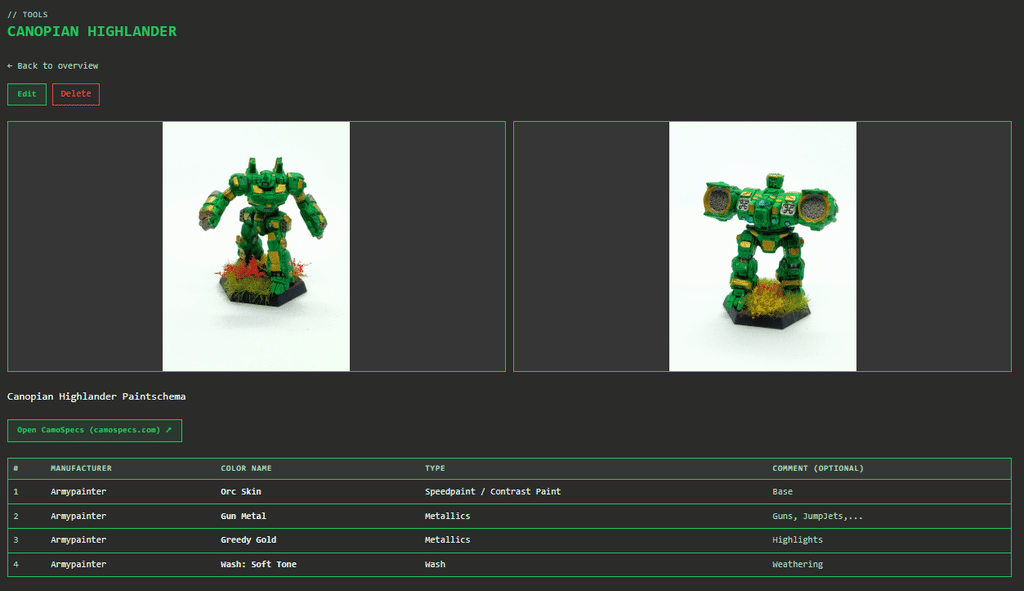
Would you like to add two new mechs to an existing Lanze after several months, but can’t remember the paint mix? Starting now, at Tools → Farbschemas, you can:
- Document paint recipes: Note the colors, manufacturers (Citadel, Vallejo, Army Painter, etc.), and intended use (base coat, shade, accent).
- Photos & CamoSpecs: Upload up to two reference photos and link to the corresponding CamoSpecs template.
- Hangar Link: Link miniatures in your Digital Hangar directly to the recipe for a 100% consistent look over the years.
My Conclusion
I’m thrilled with the progress made in the November update. With the OpFor Generator, we’ve created a tool that saves me hours of work preparing demo rounds and solo battles. Combined with the transparency of the Safe-Buy Advisor and the depth of the Epoch Dossier, The Tactical Screen is becoming even more of a one-stop shop for planning and analyzing army lists.
The new features in the comparison view provide both beginners and experienced players with new and important insights.
Transparency notice on the use of AI (in accordance with the EU AI Act):
The content of this blog is personally conceived, researched and defined by me. I use generative artificial intelligence to help me formulate and structure the texts.
Why? This enables me to prepare complex issues more precisely and to focus fully on the quality of the content and research. The final editorial control and responsibility for all published content lies solely with me.
Together for better content!
This blog is a project of the heart that can only continue to grow with your help. Every comment, every recommendation – and especially your financial support – secures the future of this platform.
Do you want this content to remain freely accessible?
This is how you can support the mission:
- NEWSLETTER REGISTRATION: Become part of the fast-growing community and never miss an update again!
- BECOME A PATREON MEMBER: Join the inner circle and get access to exclusive material and early releases.
- OTHER SUPPORT: Whether it’s a donation, sharing a post or recommending the blog to others – every form of support counts!
Let’s make this blog an even better place together!

Ich bin Sören Spieckermann, der Kopf hinter mechstrategen. Seit Jahren faszinieren mich taktische Tabletop-Schlachten und die strategische Tiefe von Mechs. Ob schnelle Gefechte in Halo: Flashpoint oder epische Schlachten bei BattleTech Alpha Strike – hier teile ich meine Erfahrungen und Taktiken mit dir. Mein Ziel? Sowohl Einsteigern den Start zu erleichtern als auch alten Hasen neue Impulse für das nächste Match zu geben.