
Reactor Ops
Expert analysis and guide to using the Reactor Ops tools for BattleTech Alpha Strike
This report serves as a comprehensive technical guide to using the Reactor Ops (RO) tools in the context of BattleTech Alpha Strike, with a focus on increasing the efficiency of force building and managing advanced campaign structures. The analysis corrects the colloquial terms “campaign and hangar fault” and instead explains the correct, highly specialized features: the Hangar Vault and the Chaos Campaign: Mercenaries Campaign Manager including the Formation Engine.
1. introduction and definition of the Reactor Ops tools
1.1. What is Reactor Ops? Core functions and development history
Reactor Ops is a primary digital tool for the BattleTech franchise, designed specifically for unit search and force building. The tool supports both the Classic BattleTech rules system, based on Battle Value (BV), and the fast Alpha Strike, which uses Point Value (PV).
The core value of Reactor Ops lies in its ability to search and manage a comprehensive database of over 7,400 units. The tool is developed and maintained by a single developer, BattleMaster 1-G. In the BattleTech ecosystem, Reactor Ops is widely regarded as a more user-friendly and robust alternative compared to traditional list building tools such as the Master Unit List (MUL) Force Builder.
Reactor Ops is therefore not a replacement for the official data sources, but acts as an optimized front-end for the complex BattleTech data. Its main contribution to the community is the significant increase in efficiency in list and campaign management by improving the accessibility of important data and removing administrative hurdles.
1.2. Activation of Alpha Strike mode and the basis of data integrity
The dedicated Alpha Strike mode was comprehensively introduced in Reactor Ops with version 0.9.5. This feature is fundamental for Alpha Strike players, as it can be activated at any time via a simple toggle switch.
Activating the Alpha Strike mode leads to an immediate adjustment of the user interface and the underlying data parameters. This includes:
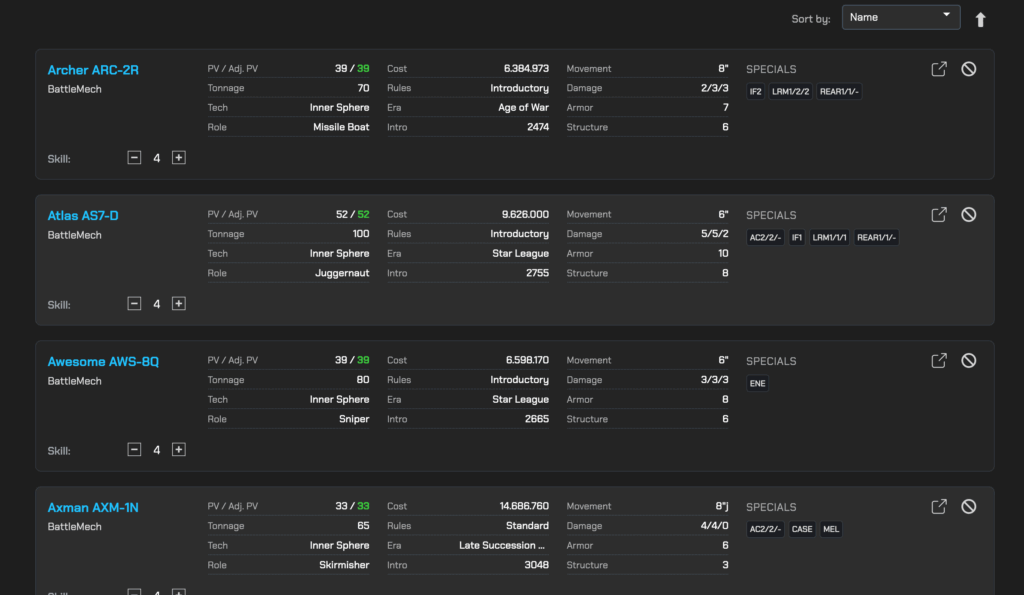
- Statistics customization: The display changes from Battle Value (BV) to Point Value (PV). Important Alpha Strike specifics such as the Target Movement Modifier (TMM), armor and structure values as well as the standardized short/medium/long damage profiles are prominently displayed.
Filter update: The filter systems adapt to the AS-specific parameters, as described in detail in the following section.
Map output: The export function for unit maps has been changed to the printable Alpha Strike format.
This instant conversion ensures that the user is working within the Alpha Strike paradigm from the very first moment of unit research.
2. detailed guide to simplifying the Alpha Strike Force Building
Roster building in BattleTech Alpha Strike is a balancing act between point value (PV) limitations, tactical role requirements and unit synergy. Reactor Ops simplifies this process with powerful search filters and automated roster management.
2.1. The search function as a central element and its logic
The force building process in Reactor Ops begins on the “Search” page, which provides access to the entire unit catalog. The effectiveness of the search is based on a rigorous “AND” logic when applying multiple filters. This means that a unit will only appear in the search results if it meets all the criteria activated at the same time.
An important exception to this strict “AND” logic applies to categories in which units can typically have multiple attributes, such as quirks, weapons or faction affiliations. Here, several values can be filtered simultaneously to find units that have at least one of the selected attributes.
2.2. Using the Alpha Strike special filter: precise unit selection
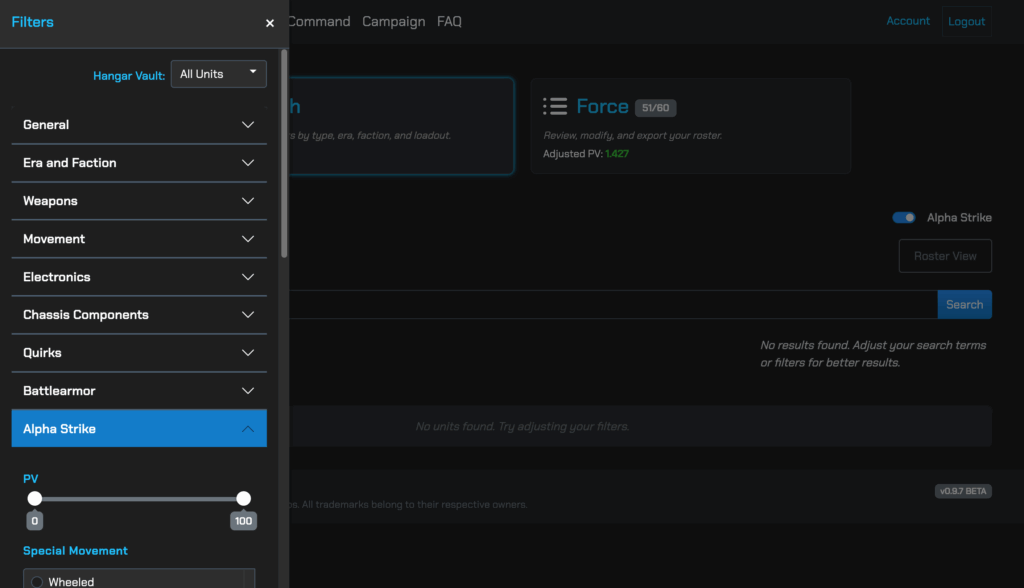
The dedicated filter section for Alpha Strike in Reactor Ops enables a highly precise quantitative and qualitative selection that goes beyond simple criteria such as tech base or weight class.
Quantitative power filters
Reactor Ops enables direct filtering based on numerical combat performance parameters, which is essential for PV budget compliance and tactical role assignment.
The availability of such precise filters transforms the process of force construction. Instead of having to manually search the entire database, players can construct a force directly based on tactical role requirements. For example, if a fire support element is required, the search can be quickly narrowed down to heavy ‘Mechs with a high long-range damage rate and IF capability. This supports a modern, role-based force composition that optimizes the effectiveness of the resulting force.
2.3. Roster management and the key to simplification: PV automation
Once suitable units have been identified, they are added to the roster list, referred to as “Force” in Reactor Ops.
Display and real-time adjustment
The units are displayed as detailed “cards” that provide all relevant information for quick evaluation. The main simplification lies in the automated calculation of the point value (PV).
- Skill customization and PV: Reactor Ops allows easy customization of the pilot skill level (4 by default) for each unit.
Real-time automation: If the pilot skill is changed (e.g. from 4 to 3 for an elite pilot), the tool recalculates the PV value of the unit and the total PV of the entire force immediately and in real time.
This automated PV calculation is critical as it eliminates the need to manually apply the complex pilot skill multipliers or memorize the underlying rules. Eliminating this clerical burden is the primary benefit Reactor Ops provides in force building, as it digitizes the main source of administrative errors and wasted time.
3. integration and export of force data
Reactor Ops is not only a list generation tool, but also a platform for physical game preparation and integration into the broader digital BattleTech ecosystem.
3.1. Generation of ready-to-play Alpha Strike cards
After completing the Force compilation, the user can export ready-to-play Alpha Strike Cards (AS Cards) directly. These printed cards contain all the necessary information for gameplay, including the final PV value, all movement rates, damage profiles, TMM, as well as all specials. The cards reflect the skill-adjusted stats, which means that the user does not need to make any further adjustments for elite or greenhorn pilots.
3.2. Interoperability through export formats
Export flexibility is a critical aspect of interoperability. Reactor Ops allows the force to be exported in various formats: PDF, CSV, and especially the .mul format.
- The
.mulexport: This format is crucial as it allows seamless integration with other community tools. Reactor Ops focuses on efficient list creation, but does not generate record sheets directly. Through the.mulexport, the force list created in RO can be immediately imported into programs such as MegaMek MekLab or Flechs Sheets, which then provide the detailed record sheets for each unit. This approach ensures that the user can take advantage of the fast list generation in RO without having to sacrifice the rules details of the record sheets.
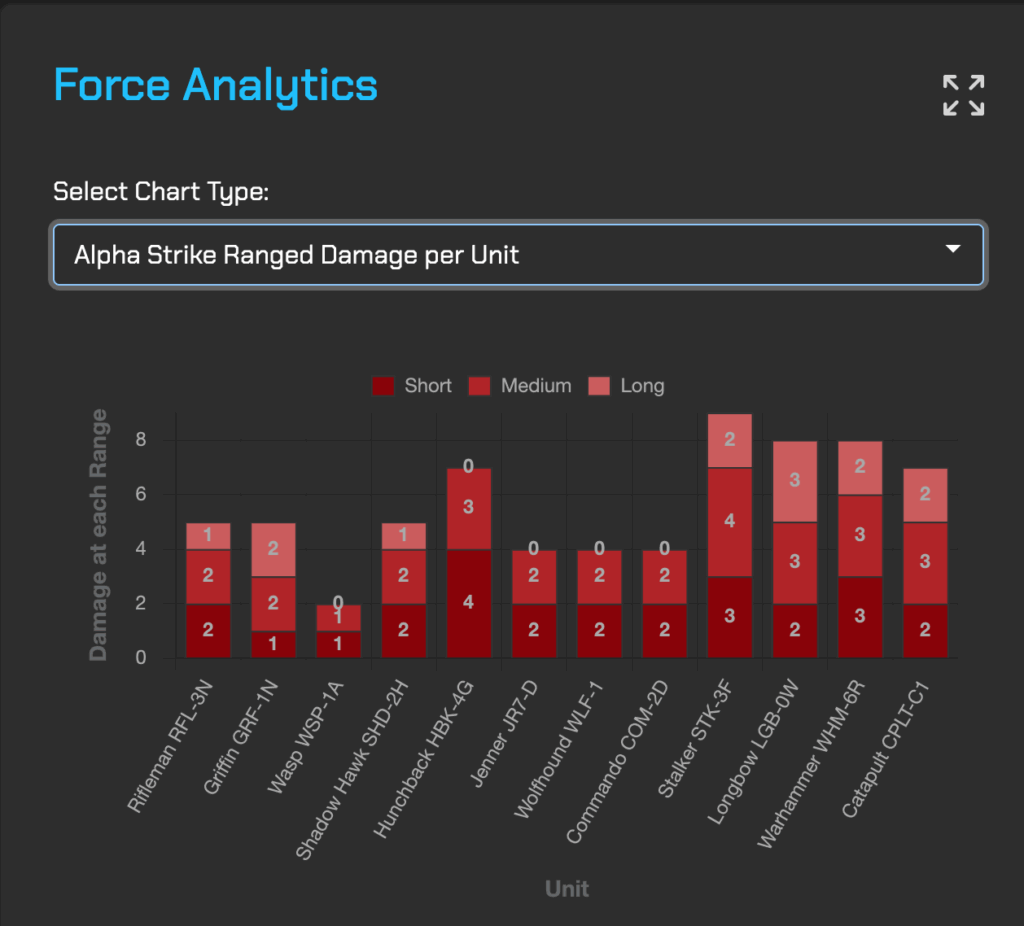
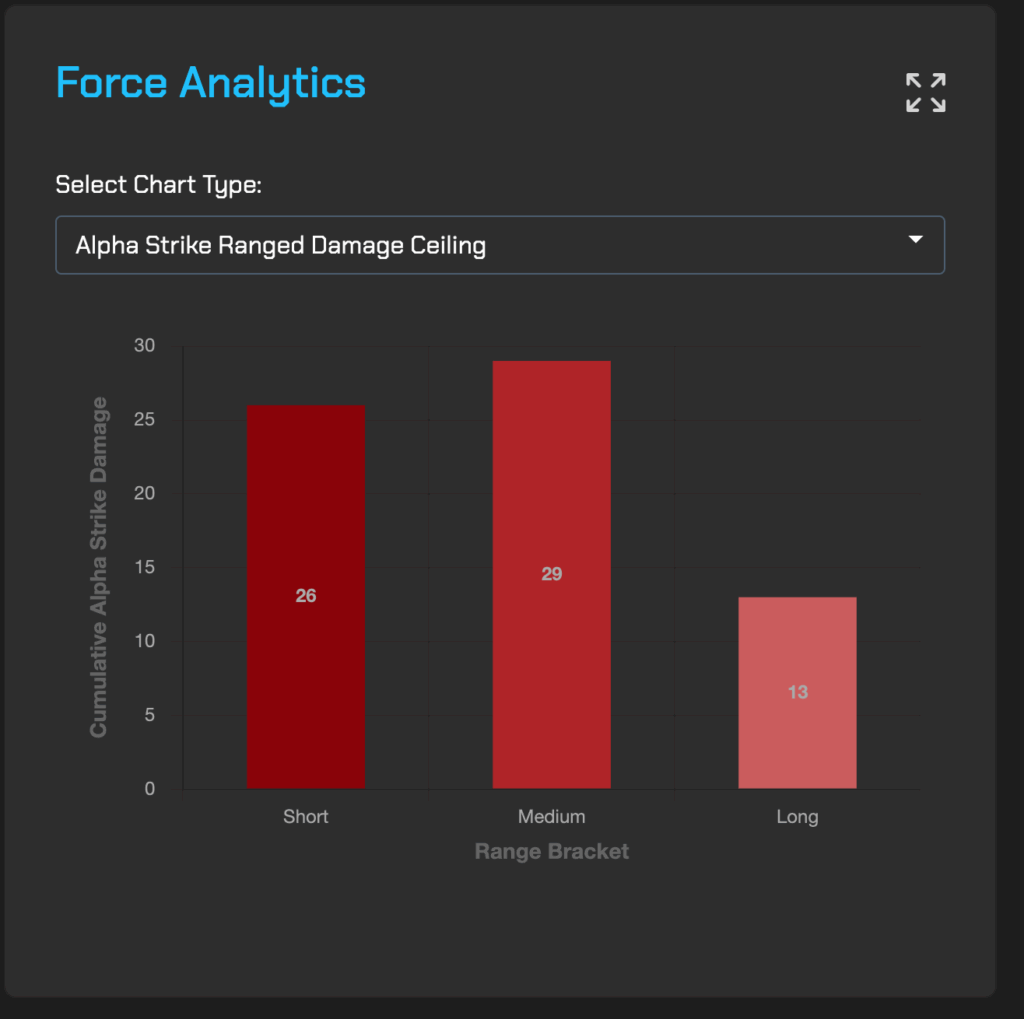
3.3. Force analysis: Ranged Damage Ceiling
As an analytical tool for evaluating offensive capability, Reactor Ops offers the calculation of the Ranged Damage Ceiling for the entire force. This value quantifies the maximum possible damage that the force could deal at range in a single round, even if reaching this theoretical maximum is rare in practice.
The Ranged Damage Ceiling serves as an important metric for players to internally evaluate their force composition. A force with a higher ceiling is typically able to deal more ranged damage on average with the same skill base. While it is up to the player to interpret this value, it provides an immediate quantitative indication of firepower compared to other possible force compositions.
4. the feature duo for advanced players: Hangar Vault and Campaign Manager
For dedicated players who want to combine their digital planning with physical models and complex campaigns, Reactor Ops offers two advanced features.
4.1. Hangar Vault: Inventory management and filter optimization
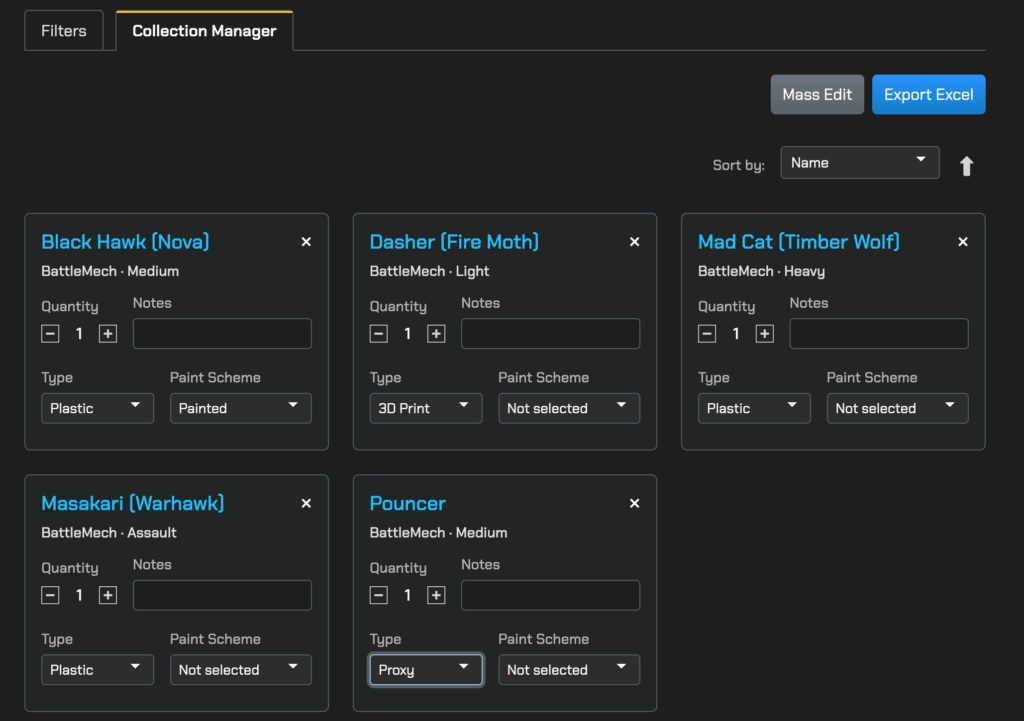
The feature referred to by the user as “Hangar Fault” is the Hangar Vault. It is a central tool for managing the physical inventory of miniatures and for optimizing the force building based on the models actually available.
How the Hangar Vault works
- Inventory: The Vault serves as a digital inventory in which players can create and store a list of their physical models – be it official miniatures, 3D prints or proxies.
Model addition: Models can be captured either by selecting entire official “ForcePacks” or by searching for and adding individual specific models.
The Hangar Vault as a precision filter
The main function of the Vault is its role as a filter on the “Search” page. Once a Vault is selected, the search results are automatically limited to those units that the player can represent with their cataloged models.
This feature solves a common problem in miniature wargaming: the discrepancy between the theoretical best list and the physical reality of the model collection. By linking the digital database with the real inventory, the Hangar Vault automatically overcomes the bottleneck of collection restriction. This considerably shortens the time between the strategic list idea and the actual playability on the table. The Vault filter can be seamlessly combined with all other search criteria (era, faction, PV).
4.2. Chaos Campaign: Mercenaries Campaign Manager
The feature referred to by the user as “Campaign Fault” is the Chaos Campaign: Mercenaries Campaign Manager. This tool was developed to manage the administrative complexity of the campaign game, especially according to the rules of Chaos Campaign: Mercenaries.
Automation of campaign management
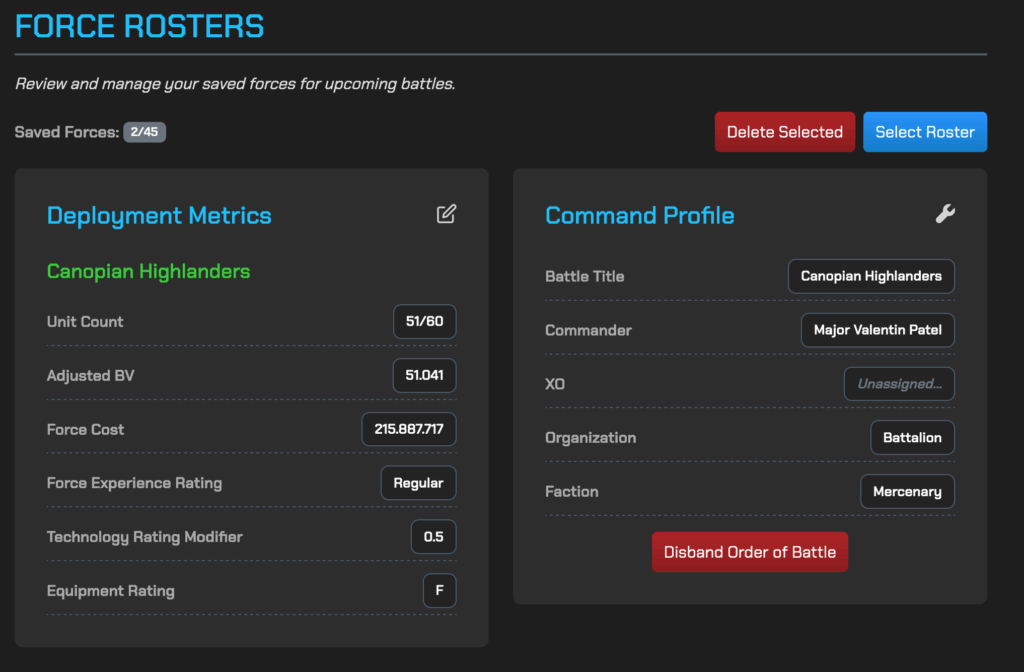
The Campaign Manager serves as a central hub for managing the entire mercenary outfit and digitizes all essential administrative processes. The declared aim of the tool is to remove almost all the math and paperwork from campaign management.
The most important automation functions include
- Financial logging: The manager logs contracts, records fight reports and calculates the fight compensation automatically.
Support Point (SP) logistics: All actions that consume or generate Support Points – such as repairing, upgrading, purchasing new units or recruiting pilots – are managed directly within the Manager interface. This eliminates the need to maintain external spreadsheets for SP tracking.
Roster maintenance: The unit statuses, the upkeep and the results of the salvage actions are managed and kept up to date after each mission.
Overview: Important campaign parameters such as current support points, the reputation of the mercenary company and its scale can be seen at a glance at any time.
The digitalization of SP management and finance lowers the barrier to entry for narrative play, as it relieves the campaign organizer of the time-consuming role of accountant. This promotes concentration on the narrative and tactical elements of the campaign.
4.3. Data export and long-term archiving
For long-term documentation and analysis, Campaign Manager enables the export of all ledger data (finances, contracts, roster status) in standardized formats such as Excel or Google Sheets. This ensures that the entire history of the mercenary company is archived and that specific analyses can be carried out outside of Reactor Ops.
5 The Formation Engine and the Order of Battle
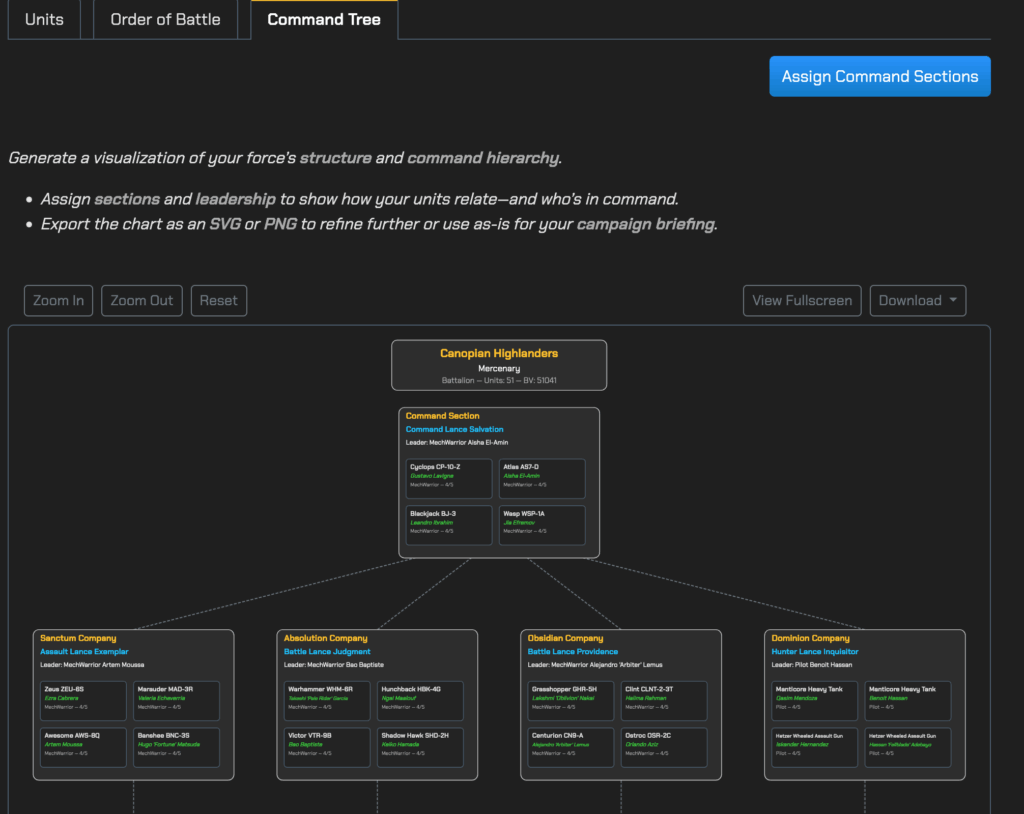
The Formation Engine is a specialized component integrated into the Command section of Reactor Ops that provides the link between a loose unit selection and a structured military battle formation.
5.1. Structured troop organization according to Campaign Operations
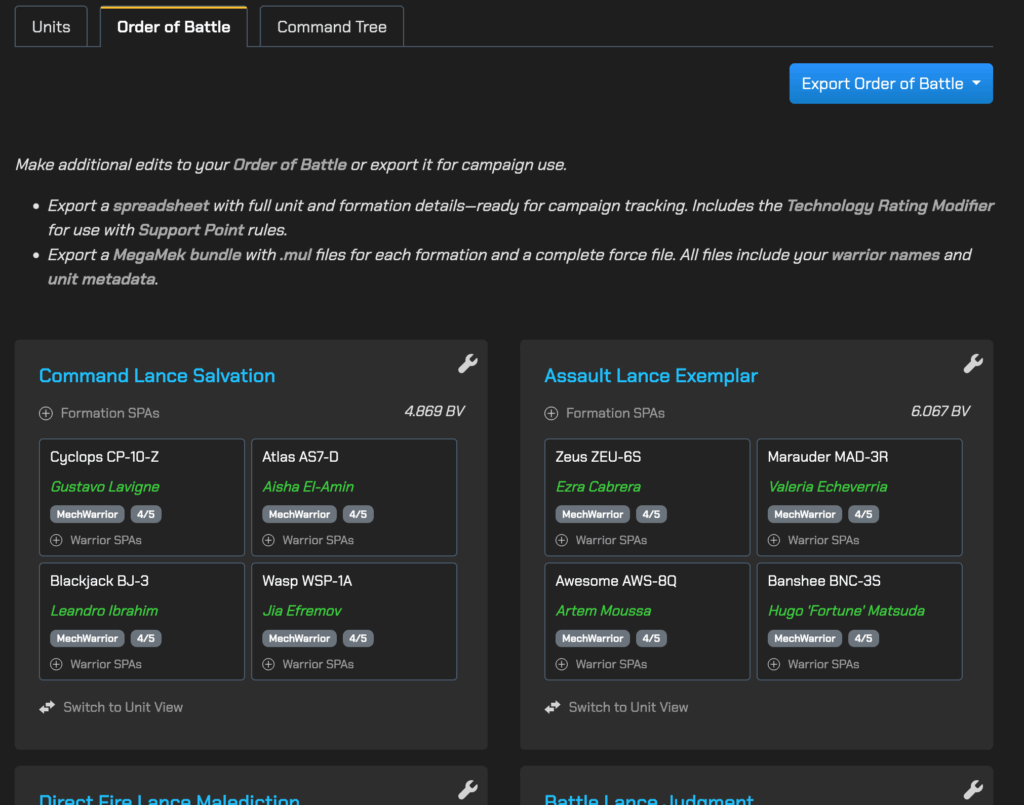
The main task of the Formation Engine is to convert the selected force into an Order of Battle (OOB), i.e. a formalized order of battle. An OOB is essential for the campaign game as it defines the hierarchical organization and pilot assignments.
The engine implements the complex rules for military formations defined in the BattleTech rulebooks, especially Campaign Operations. When generating the OOB, the engine automatically assigns the following elements:
- Formation types: Assignment to rule-compliant formations such as Lances, Stars or Level II’s.
Personalization: Generation of warrior names and ranks for the pilots.
Technical assignments: Management of specific technical assignments, such as C3 network configurations.
5.2. Export of the campaign-capable Order of Battle
The generated Order of Battle is not only useful for the internal view, but can also be exported directly from the Command area as a campaign-ready spreadsheet.
This export saves the user the time-consuming manual entry of administrative data, including detailed pilot data, final adjusted PV values, quirks and formation elements. The digital automation of this process minimizes the risk of transmission errors in the campaign’s administrative documents.
5.3. Restrictions and recommendations for the workflow
The Formation Engine strictly follows the rules of Campaign Operations. Due to this adherence to the rules, there is currently an architectural restriction: It is not possible to swap units within their assigned formations after the OOB has been generated.
The reason for this is the high complexity of rule validation. As the set of rules defines over 30 different formation types, each exchange would require a comprehensive recheck of all formation restrictions. As long as this feature is not implemented, the user is referred to a specific workflow:
Expert Workflow Recommendation: The player should finalize the exact composition and role of each unit using the Search and Force tools before launching the Formation Engine. If specific controls over the placement of units in the formations are required, the manual build mode can be used. Minor cosmetic adjustments (e.g. naming conventions or ranking) can then be made directly in the exported spreadsheet.
6. conclusion
Reactor Ops has established itself as an indispensable digital tool for BattleTech Alpha Strike players by providing a three-tiered solution to manage systemic complexity: precise unit selection, automated list validation, and specialized campaign management.
The analysis has shown that the key simplifications for force building lie in real-time PV automation. By automatically adjusting the point value based on the pilot skill, Reactor Ops eliminates the most common source of calculation errors and significantly reduces administrative overhead. The advanced Alpha Strike filters allow the player to quickly identify tactical role profiles (e.g. high TMM and ECM), which promotes the creation of synergistic and competitive lists.
The advanced features – the Hangar Vault and the Chaos Campaign: Mercenaries Campaign Manager – overcome critical physical and administrative hurdles. The Hangar Vault creates a direct link between digital list planning and the physical inventory, tailoring planning to the miniatures actually available. The Campaign Manager, on the other hand, digitizes the complex rules of the Chaos Campaign, especially the management of support points and finances , which drastically lowers the barrier to entry for in-depth, narrative campaigns.
Overall, Reactor Ops transforms the role of the BattleTech player from accountant to commander by taking the time-consuming, clerical processes of the game into the background, ensuring the immersion and longevity of both list generation and campaign play. Although development is progressing steadily, users must take into account the current limitations in the formation engine (no unit swapping) and when customizing specific infantry skills.
Together for better content!
This blog is a project of the heart that can only continue to grow with your help. Every comment, every recommendation – and especially your financial support – secures the future of this platform.
Do you want this content to remain freely accessible?
This is how you can support the mission:
- NEWSLETTER REGISTRATION: Become part of the fast-growing community and never miss an update again!
- BECOME A PATREON MEMBER: Join the inner circle and get access to exclusive material and early releases.
- OTHER SUPPORT: Whether it’s a donation, sharing a post or recommending the blog to others – every form of support counts!
Let’s make this blog an even better place together!

