
Detailed guide to Jeff’s BattleTech Tools (IIC) for Alpha Strike: troop building, live tracking and documentation
Jeff’s BattleTech Tools (IIC)
1. Introduction and context of Jeff’s BattleTech Tools (IIC)
Jeff’s BattleTech Tools, in its latest incarnation as IIC-Fork, represent an authoritative suite of digital tools aimed at significantly increasing the efficiency and accuracy of game preparation and execution for both Classic BattleTech (CBT) and Alpha Strike (AS). The application is highly regarded in the community as it is continuously maintained as an open source project to digitally master the complexity of the BattleTech rulebooks.
1.1. The nature of the application: PWA and open source
The tools are designed as a Progressive Web Application (PWA), which means that they can be accessed directly via a web browser without the need for a dedicated software installation. Access is therefore low-threshold. This technical basis enables a high level of portability. Although the user interface was primarily optimized for tablet sizes (such as iPad or iPad mini) and laptops, which leads to ideal handling during the tabletop game, use on smaller smartphone screens tends to be less clear due to the density of information.
A critical aspect of the PWA architecture and data storage is the resilience of data management. The application stores all created unit lists, lances and companies offline on the user’s local device. This design ensures smooth usability even in environments where a stable internet connection is not available, as is often the case at wargaming events or private game rounds. However, it is essential for the user to be aware of this local storage, as the loss or deletion of the browser cache or the change of the end device without prior manual export of the troop lists can lead to a loss of data.
The project is also “Forever Free” and open source. After the tragic passing of the original developer, Jeffrey D. Gordon, in 2024, the code was taken over as a fork (Jeff’s BattleTech Tools IIC) by a group of volunteers to ensure continuity and up-to-dateness. This collaborative commitment ensures the long-term reliability of the tool, as continuous maintenance is necessary to implement the complexity and constant updates of the BattleTech rulebook, such as fixing bugs in the Special Pilot Ability (SPA) costs or integrating new formation bonuses, in a timely manner.
2. Structure and navigation of the Alpha Strike roster (MUL integration)
The Alpha Strike Roster is the central module of Jeff’s BattleTech Tools (IIC) for creating and managing battle groups. It enables the seamless integration of official units and the structured organization of troops, proving to be an indispensable tool for maintaining point values (PV) and regulations.
2.1. Data procurement and unit validation
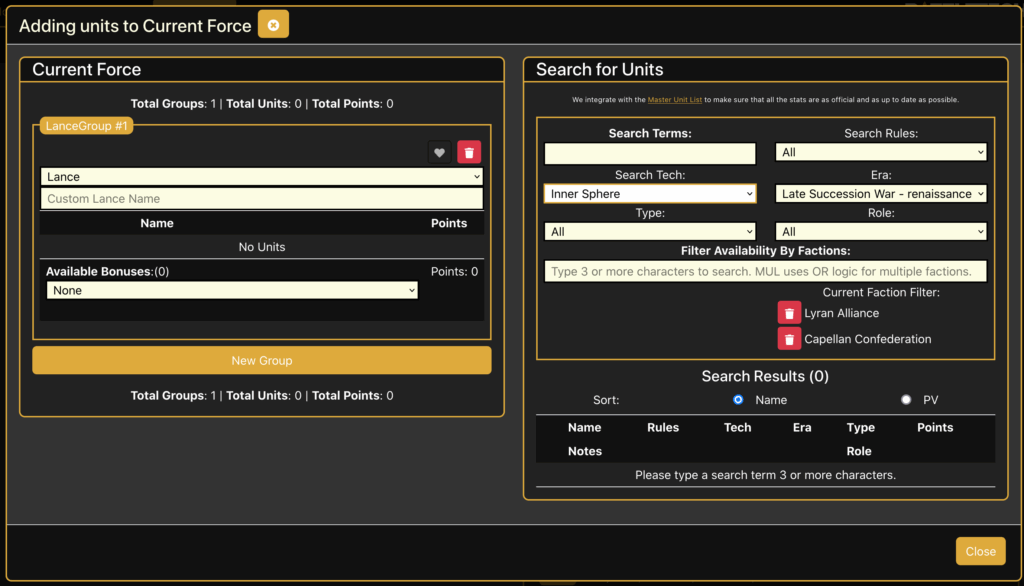
The tools obtain their unit data directly from the Master Unit List (MUL) API. This ensures that all Alpha Strike unit statistics are up-to-date and officially validated. The force building process begins with a mandatory initialization of the force parameters to ensure compliance with specific restrictions.
The user must first set the following parameters:
- Faction: The selection of the playing faction.
- Availability Era: The definition of the era in which the troop is located.
- General List: The selection of the applicable general list for the selected faction and era.
These steps are particularly important for tournament play as they pre-validate the squad against common formats such as the Wolf Net Alpha Strike 350 format at the draft stage. The Force Builder thus functions not only as a calculator, but also as a rules auditor that ensures that the composition of troops corresponds to the restrictions of the selected era and faction.
2.2. Troop management and formations
Once the basic parameters have been defined, units can be added from the MUL database using a search function. The tool supports the hierarchical organization of battle groups. Players can group their units into the standardized BattleTech formations such as lances, stars, binaries or larger companies.
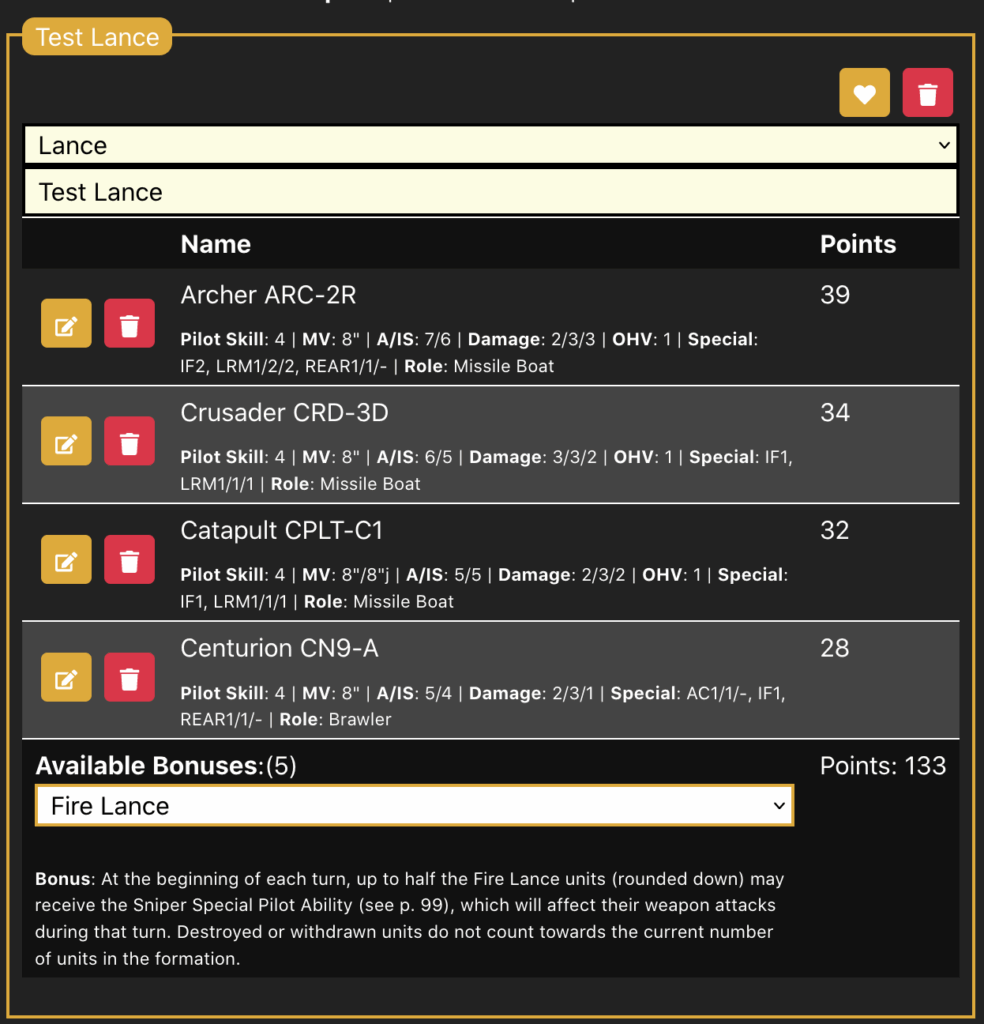
As units are added, the total PV (Point Value) of the formation and the entire squad is dynamically updated. This real-time calculation is fundamental in order to accurately meet the PV limits of scenarios or tournaments. The formation management feature also includes the ability to apply specific formation bonuses, such as the Command, Support and Battle Lances bonuses, as well as specialized formations from supplement books such as the Tukayyid bonuses (e.g. Phalanx Star).
3. Simplification of force building: efficient list design
Jeff’s BattleTech tools streamline the complex process of list creation by providing detailed customization and filtering mechanisms that go far beyond the capabilities of static lists.
3.1. Personalization and PV modification
A key element of the Force Builder is the ability to personalize units. The user can customize the Pilot Skill (PS) of each unit. Since the Pilot Skill is an integral multiplier in the Alpha Strike PV formula, the resulting PV value of the individual unit and the overall PV of the force is automatically and instantly recalculated. This ability allows experienced players to maximize the cost-efficiency of their forces by equipping costly units with higher Pilot Skills or equipping cheap cannon fodder units with lower skills.
In addition, the developers are continuously integrating new units that become physically available through new force packs, for example. This ensures that the database is always up to date and that no officially available models are missing.
3.2. Advanced search filters for optimized composition
Given the thousands of units in the Master Unit List, precise filtering is essential. Jeff’s tools offer a highly specialized search syntax that allows the player to create thematic or tactically optimized lists. These filters are capable of complex logical operations (AND, NOT) and comparison operators.
Mastering this syntax is essential for players who are specifically looking for a “fast, jumping striker with armor of 4 to 6 and at least 3 medium damage”, for example. The syntax uses special prefixes to identify the characteristics you are looking for.
The following table lists the most important advanced search operators that enable a precise selection:
Table 3.2: Advanced search operators in the Alpha Strike Roster Builder
| Criterion | Operator | Syntax example | Logic / Explanation |
| Skills | a:<ability> | a:IF,ECM | Searches for units with all specified abilities (comma = AND). Negation: a:!CASE excludes units with CASE. |
| Point value (PV) | pv:<value/range> | pv:30-50 | Filters according to PV areas. Supports comparison operators (>=, <). |
| Damage | short/medium/long | long>=3 | Filters based on minimum damage values at certain ranges. |
| Exact profile | dmg:x/y/z | dmg:3/3/* | Filters according to exact damage profiles (near/medium/far). Wildcard * is supported. |
| Defense | armor>=x, structure>=x, defense>x | defense>12 | Filter by Armor, Structure or the combined Armor+Structure (Defense). |
| Movement | mv>=x, jump>x | mv>=10 jump>0 | Filters by minimum movement rate and jumping ability. |
| Technology/era | tech:, year: | tech:clan year:3050-3067 | Filters by technology base and introduction era. |
Examples illustrate the efficiency: The command timber wolf a:IF,long>=3 filters all Timber Wolves that have both IF (Indirect Fire) and cause at least 3 damage in the long range. Another example, role:Striker mv>=10 jump>0, finds all fast jumping strikers.
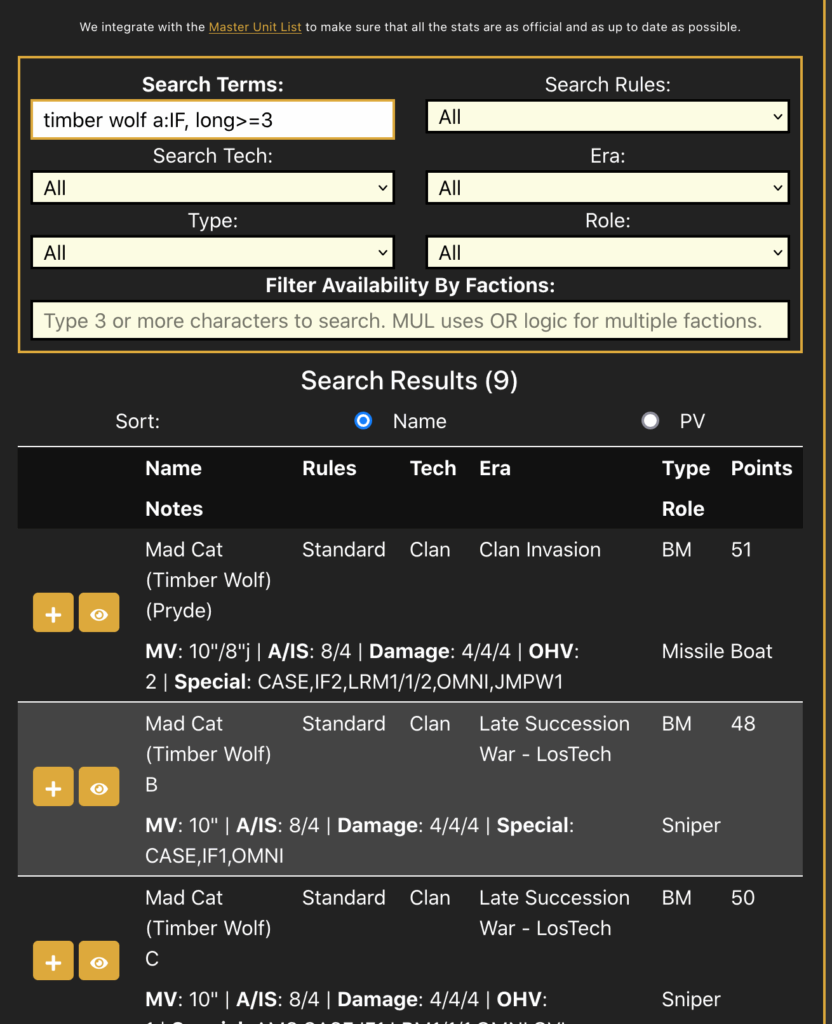
timber wolf a:IF,long>=3 filters all Timber Wolves that have both IF (Indirect Fire) and cause at least 3 damage in the long range3.3. Rule-compliant application of formation bonuses
The tool supports the rule-compliant application of formation bonuses, which greatly reduces the need for manual rule checks. The application automatically integrates all standard lance formations (e.g. Command, Support, Battle Lances).
An important feature based on the Alpha Strike Commander’s Edition (ASCE) rules is the automated validation of troop composition. The tools actively enforce the rule that at least three units must be present in a formation before the corresponding formation bonus can be selected and applied. This implementation serves as a mechanism to prevent errors, especially for new players, by eliminating the incorrect application of bonuses for incomplete formations. The tool thus takes on the role of a rule validator and ensures greater conformity, which increases the quality of play and minimizes discussions about list creation before the game.
4. The play mode: live tracking and digital playing cards
Play Mode is the centerpiece of Jeff’s BattleTech Tools’ efficiency enhancement for live play. It converts the troop list into a stack of interactive, digital playing cards that manage all calculations and status changes in real time.
4.1. Overview and real-time updating
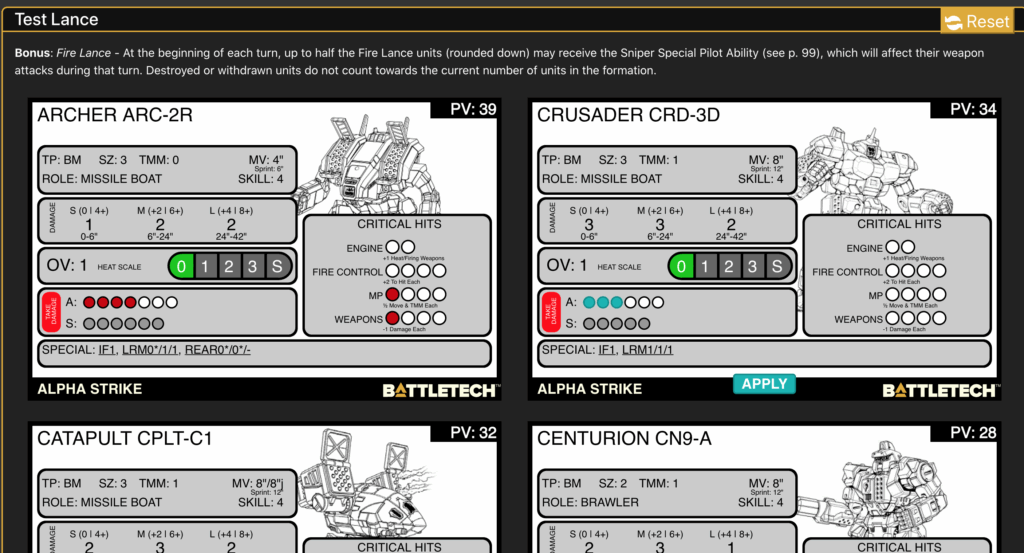
In play mode, the Alpha Strike Cards are displayed digitally (“live in-play virtual stack”). As soon as a unit takes damage, generates heat or executes its movement, the effects are immediately reflected on the map. This eliminates the need to manually keep physical record sheets and speeds up gameplay considerably. Key metrics, such as hit rolls, are updated on-the-fly.
4.2. Dynamic damage tracking and heat management
The tool uses a nuanced damage tracking mechanism to accurately reflect the rules of Alpha Strike round dynamics.
Phased damage staging
A significant improvement in Play Mode is the concept of Phased Damage Staging. Damage inflicted during the current round is not immediately applied to the permanent unit stats. Instead, this damage is displayed in blue on the map. The permanent status changes, such as the reduction of maneuverability (TMM) due to structure hits (Motive Hits) or the settlement of Critical Hits, only take effect when the player manually executes the ‘Apply’ or ‘End Round’ command.
This mechanism is of strategic importance, as it ensures that all attacks in a phase are executed against the same modifiers valid at the start of the phase. This prevents inconsistent modifier changes in the middle of the firefight.
Critical hits and heat
The tool manages the complex effects of critical hits. If a unit suffers a critical hit, the values of the corresponding special weapon attacks, such as LRM (Long Range Missile), SRM (Short Range Missile), IF (Indirect Fire) or TUR (Turret), are automatically reduced.
Heat management is also automated. The generated heat is automatically assigned to the heat scale at the end of the movement and fire phases based on the selected movement mode and the weapons fired. The accumulated Heat value influences the unit’s To-Hit modifier in subsequent rounds according to the Heat Scale.
5. The PDF/Print mode: Export and game documentation
The PDF/Print mode is the interface between digital creation and physical use at the gaming table. It enables the export of fully created and modified Alpha Strike Forces in a documentable, printable format.
5.1. Export formats and layout options
The print mode generates the created Alpha Strike Forces in a printable layout, which effectively corresponds to a PDF export. The printed Alpha Strike Cards are designed to contain all the necessary information for the physical game and can serve as reliable secondary record sheets in case of technical difficulties.
A key feature for tabletop players is the flexibility of movement display. The printed Alpha Strike Cards offer the option to display all movement and range measurements in hexes as desired. This is an essential feature for players who traditionally play Alpha Strike on hex cards rather than inch tape, and allows the digital tools to be used without ignoring the preferences of the physical game medium.
The Play Mode user interface also makes it possible to customize the arrangement of the digital cards by configuring the number of cards displayed per row. This improves readability, especially on devices with smaller screens.
5.2. Analysis of the printed map layout
The structure of the printed maps, as shown in the example of the ENFORCER ENF-4R, is highly functional and detailed. The cards contain all the basic statistics as well as specific tracking elements that are essential for manual play.
The information contained on the printed cards includes
- Basic statistics: Point Value (PV), Type (TP: BM), Size (SZ), TMM (Tactical Movement Modifier) and Movement Rates (MV), including sprint and jump distances.
- Role and skill: The unit-specific role (ROLE, e.g. STRIKER) and the customized pilot skill (SKILL).
Damage profiles: The exact damage values at the three ranges (S/M/L) and the corresponding modifiers for the hit roll.
Tracking sections: Detailed, blank boxes are provided for manual tracking of Critical Hits, Heat Scale (0, 1, 2, 3, S) and specific Fire Control modifiers. These sections remind the player of the effects of Heat (+2 To Hit Each) and Motive Hits (A: ½ Move & TMM Each).
Special abilities: The specific Alpha Strike abilities (SPECIAL), such as IF1, SRCH, TUR (Indirect Fire, Searchlight, Turret), are clearly listed, often supplemented by the exact damage values of the Turret attack.
Providing these comprehensive printouts with optional hex display is an effective support for the hybrid tabletop experience, combining the efficiency of digital list design with the feel and reliability of physical game materials.
6. extended use and custom content integration
Jeff’s BattleTech Tools offer advanced features for advanced users, especially in the area of custom unit creation and integration, making it a comprehensive design and validation tool.
6.1. The ‘Mech Creator (CBT to AS conversion)
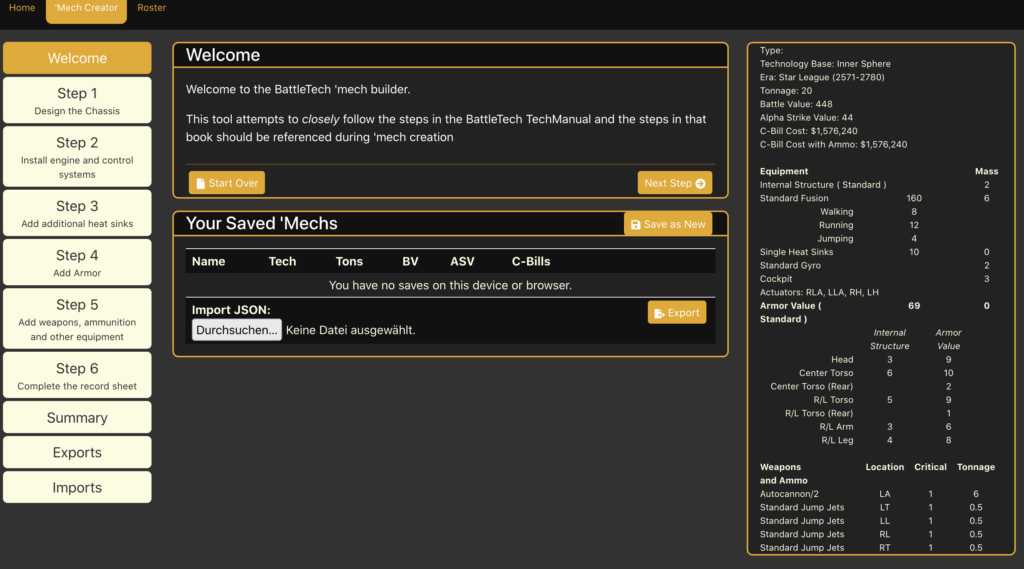
The ‘Mech Creator is a module that was primarily developed for Classic BattleTech (CBT), but fulfills a crucial bridging function for Alpha Strike players. It enables the construction of ‘Mechs according to the detailed steps of the Classic BattleTech Tech Manual.
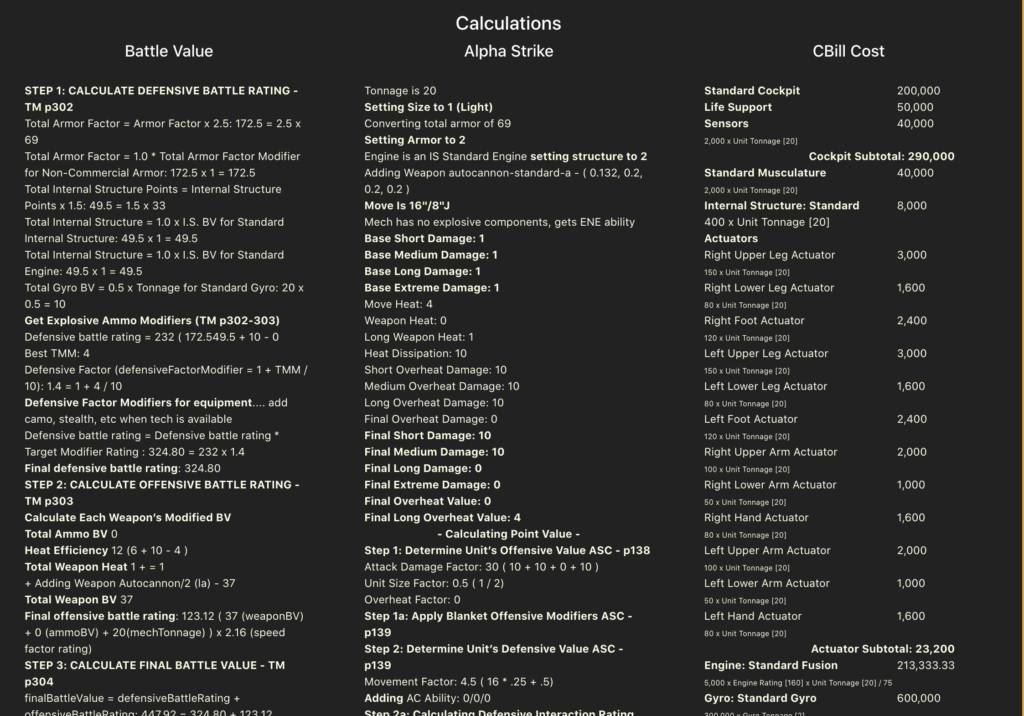
The key benefit for Alpha Strike players is the automated conversion. Once a ‘Mech has been designed according to the CBT rules, the tool automatically calculates the BattleValue 2 (BV2), C-Bill cost and, most importantly, the correct Alpha Strike Stats (ASV) for that custom design. Once created, these custom ‘Mechs can be saved and integrated directly into the user’s Alpha Strike Roster for use in the squad list.
The functionality also includes detailed CBT features, such as the allocation of critical hit slots and the correct allocation of equipment.
6.2. Data compatibility and SSW import
To ensure the technical accuracy of the generated values, the tool offers a tentative import function for the master file format of the popular community software Solaris Skunk Werks (SSW). SSW is considered the de facto standard in the BattleTech community for detailed CBT mech design.
The developers have carried out extensive internal validations and found that the C-Bill and BV2 cost calculations for a large number of units (e.g. the 3039 TRO) are 100% in line with the SSW values. This verification of mechanical correctness is proof that the alpha strike values generated by the tool for custom units are technically verified and reliable.
The tool supports the export and import of data in JSON format for the exchange and backup of custom designs. This enables the manual management and cross-platform exchange of custom units, regardless of local storage.
6.3. Future developments and match play generator
The continuous development of the IIC version focuses on supporting organized play. A more recent addition is the Alpha Strike Match Play Generator.
This module is designed to allow players to create scenarios, set deployment rules and apply a custom ban system for the Alpha Strike Match Play Beta. This extension positions Jeff’s Tools not only as a pure game aid, but also as a comprehensive organization and preparation tool for competitive, formal Alpha Strike match play.
7 Conclusions and strategic recommendations
Jeff’s BattleTech Tools (IIC) represents a critical digital ecosystem for the modern Alpha Strike player. The application goes far beyond simple list building by acting as a dynamic rules auditor, automated calculator and platform for custom content.
The central strength lies in the comprehensive automation of the game mechanics. The immediate recalculation of the PV when adjusting the pilot skill and the rule-compliant enforcement of formation requirements (at least 3 units) eliminate the most common sources of error and dramatically accelerate the flow of the game. The introduction of staggered damage tracking (blue color) is an outstanding example of the nuanced technical mapping of complex Alpha Strike rules.
For advanced users who want to use their own designs, the tools offer a technical gold standard for validating the alpha strike values of custom units thanks to SSW compatibility and the integrated ‘Mech Creator.
In summary, using Jeff’s BattleTech Tools (IIC) is the recommended method for Alpha Strike players seeking maximum efficiency in troop creation and the highest level of rules accuracy during live gameplay. The hybrid approach, allowing both live tracking on tablets and high quality, customizable (hex option) PDF printouts , ensures that the tool is suitable for all game environments. It is recommended to perform regular export backups of local data in JSON format to ensure long-term data resilience.
Transparency notice on the use of AI (in accordance with the EU AI Act):
The content of this blog is personally conceived, researched and defined by me. I use generative artificial intelligence to help me formulate and structure the texts.
Why? This enables me to prepare complex issues more precisely and to focus fully on the quality of the content and research. The final editorial control and responsibility for all published content lies solely with me.
Together for better content!
This blog is a project of the heart that can only continue to grow with your help. Every comment, every recommendation – and especially your financial support – secures the future of this platform.
Do you want this content to remain freely accessible?
This is how you can support the mission:
- NEWSLETTER REGISTRATION: Become part of the fast-growing community and never miss an update again!
- BECOME A PATREON MEMBER: Join the inner circle and get access to exclusive material and early releases.
- OTHER SUPPORT: Whether it’s a donation, sharing a post or recommending the blog to others – every form of support counts!
Let’s make this blog an even better place together!

